UX designers should get into everyware

I’ve been reading Adam Greenfield’s Everyware on and off and one of the things that it has me wondering the most lately is: are UX professionals making the move to design for ubiquitous computing?

There’re several places in the book where he explicitly mentions UX in relation to everyware. Let’s have a look at the ones I managed to retrieve using the book’s trusty index…

On page 14 Greenfield writes that with the emergence of ubicomp at the dawn of the new millennium, the user experience community took up the challenge with “varying degrees of enthusiasm, scepticism and critical distance”, trying to find a “language of interaction suited to a world where information processing would be everywhere in the human environment.”

So of course the UX community has already started considering what it means to design for ubicomp. This stuff is quite different to internet appliances and web sites though, as Greenfield points out in thesis 09 (pp.37-39):

“Consistently eliciting good user experiences means accounting for the physical design of the human interface, the flow of interaction between user and device, and the larger context in which that interaction is embedded. In not a single one of these dimensions is the experience of everyware anything like that of personal computing.” (p.37)

That’s a clear statement, on which he elaborates further on, mentioning that traditional interactions are usually of a “call-and-response rhythm: user actions followed by system events.” Whereas everyware interactions “can’t meaningfully be constructed as ‘task-driven.’ Nor does anything in the interplay between user and system […] correspond with […] information seeking.” (p.38)

So, UX designers moving into everyware have their work cut out for them. This is virgin territory:

“[…] it is […] a radically new situation that will require the development over time of a doctrine and a body of standards and conventions […]” (p.39)

Now, UX in traditional projects has been prone to what Greenfield calls ‘value engineering’. Commercial projects can only be two of these three things: fast, good and cheap. UX would support the second, but sadly it is often sacrificed for the sake of the other two. Not always though, but this is usually dependent on who is involved with the project:

“[…] it often takes an unusually dedicated, persistent, and powerful advocate […] to see a high-quality design project through to completion with everything that makes it excellent intact. […] the painstakingly detailed work of ensuring a good user experience is frequently hard to justify on a short-term ROI basis, and this is why it is often one of the first things to get value-engineered out of an extended development process. […] we’ve seen that getting everyware right will be orders of magnitude more complicated than achieving acceptable quality in a Web site, […] This is not the place for value engineers,” (p.166)

So if traditional projects need UX advocates on board with considerable influence, comparable to Steve Jobs’s role at Apple, to ensure a descent user experience will it even be possible to create ubiquitous experiences that are enjoyable to use? If these projects are so complex, can they be even gotten ‘right’ in a commercial context? I’m sorry to say I think not…

Designers (used broadly) will be at the forefront of deciding what everyware looks like. If you don’t think they will, at least I’m sure they should. They’re not the only ones to determine its shape though, Greenfield points out that both regulators and markets have important parts to play too (pp.172-173):

“[…] the interlocking influences of designer, regulator, and market will be most likely to result in beneficial outcomes if these parties all treat everyware as a present reality, and if the decision makers concerned act accordingly.” (p.173)

Now there’s an interesting notion. Having just come back from a premier venue for the UX community to talk about this topic, the IA Summit, I’m afraid to say that I didn’t get the impression IAs are taking everyware seriously (yet.) There were no talks really concerned with tangible, pervasive, ubiquitous or ambient technologies. Some basic fare on mobile web stuff, that’s all. Worrying, because as Greenfield points out:

“[UX designers] will best be able to intervene effectively if they develop appropriate insights, tools, and methodologies ahead of the actual deployment of ubiquitous systems.” (pp.173-174)

This stuff is real, and it is here. Greenfield points to the existence of systems such as Octopus in Hong Kong and E-ZPass in the US. Honestly, if you think beyond the tools and methods we’ve been using to communicate our designs, IxDs and IAs are well-equipped to handle everyware. No, you won’t be required to draw wireframes or sitemaps; but you’ll damn well need to put in a lot of the thinking designers do. And you’ll still need to be able to communicate those designs. It’s time to get our hands dirty:

“What fully operational systems such as Octopus and E-ZPass tell us is that privacy concerns, social implications, ethical questions, and practical details of the user experience are no longer matters for conjecture or supposition. With ubiquitous systems available for empirical enquiry, these things we need to focus on today.” (p.217)

So, to reiterate the question I started with: are there any UX designers out there that have made the switch from web-work to ubicomp? Anyone considering it? I’d love to hear about your experiences.

Harmonious interfaces, martial arts and flow states

Screenshot of the game flOw

There’s been a few posts from the UX community in the recent past on flow states (most notably at 37signals’s Signal vs. Noise). This got me thinking about my own experiences of flow and what this tells me about how flow states could be induced with interfaces.

A common example of flow states is when playing a game (the player forgets she is pushing buttons on a game pad and is only mindful of the action at hand). I’ve experienced flow while painting but also when doing work on a PC (even when creating wireframes in Visio!) However, the most interesting flow experiences were while practising martial arts.

The interesting bit is that the flow happens when performing techniques in partner exercises or even fighting matches. These are all situations where the ‘system’ consists of two people, not one person and a medium mediated by an interface (if you’re willing to call a paint brush an interface that is).

To reach a state of flow in martial arts you need to stop thinking about performing the technique while performing it, but in stead be mindful of the effect on your partner and try to visualize your own movements accordingly. When flow happens, I’m actually able to ‘see’ a technique as one single image before starting it and while performing it I’m only aware of the whole system, not just myself.

Now here’s the beef. When you try to translate this to interface design, it’s clear that there’s no easy way to induce flow. The obvious approach, to create a ‘disappearing’ interface that is unobtrusive, minimal, etc. is not enough (it could even be harmful). In stead I’d like to suggest you need to make your game, software or site behave more like a martial arts fighter. It needs to push or give way according to the actions of it’s partner. You really need to approach the whole thing as an interconnected system where forces flow back and forth. Flow will happen in the user when he or she can work in a harmonious way. Usually this requires a huge amount of mental model adaptation on the user’s part… When will we create appliances that can infer the intentions of the user and change their stance accordingly? I’m not talking about AI here, but what I would like to see is stuff more along the lines of flOw.

iPhone

iPhone playing The Office

There have been so many posts on the iPhone lately that I’ll try not to add to the noise with things that have already been said. Web designer Jeremy Keith and interaction designer Dan Saffer have both tried to gather all the worthwhile posts on the topic, from differing perspectives. I’m sure they’ll make for plenty of (more or less interesting) reading.

My own view is that Apple have proven once again that they’re great at integrating tech that was already out there in a package that offers a pleasing user experience. I’m curious about the multi-touch screen and the apparent gestural and tangible interaction it offers. I’m underwhelmed by their choice to have the device work only with Cingular (which apparently is kind of crap) and am curious if they’ll do the same when it’s introduced on this side of the ocean.

In short: I’ll have to actually use the thing to decide whether it’s as good as it seems; it’ll come down to not just the UI, but also the performance of the GSM, WiFi, camera, and on and on. For now, I’m having fun watching the online demos (at least that’s one thing Apple is very good at).

Accessibility (a Euro IA theme)

It’s been a while, but here’s my final post on the Euro IA Summit. Usability has been a design value long championed by HCI professionals from which IA has partly developed. Naturally, they’ve often been responsible for ensuring usability in projects. There have been developments that force IAs to take a broader view and see usability as one of many values that go into a successful user experience on the web. Morville realised this quite a while ago and reminded us in his keynote of his user experience honeycomb.

Accessibility is one of those other values, and quite a few talks discussed it in some way.

For instance Fredy Oré’s talk on the project he did for Digital UK (the independent, non-profit organisation leading the UK’s move to digital television) contained quite a few examples of how he as an IA was faced with accessibility problems. From figuring out how to create a site structure that would support both English as well as Welsh to working around the limitations of a legacy CMS, there were many accessibility-related decisions to make.

Bogo Vatovec summarized the results from a test he did with several content adaptation solutions (mobile web browsing applications). The state of affairs in this area appeared to be quite sordid. Opera’s mobile web browser came out as the best option currently available. However, smart software will never be the silver bullet to solve all mobile web-browsing woes. We’ll need to build sites to be accessible for a broad range of devices. I feel we need to go even one step further and create alternative architectures specifically tailored for the mobile context.

Finally Steven Pemberton flexed his W3C muscles and overwhelmed the poor non-techy IAs with a deluge of information on new web standards such as XHTML 2 and XForms. The key takeaways for me were that the W3C is still pushing for a true Semantic Web (yes, uppercase). Example: Pemberton said XHTML 2 is “microformats done right”. Also, XForms promise to be a real alternative for other RIA technology, with the main benefit that it won’t need third party technology to be installed on the client.

So again, I expect IAs to be involved in more and more accessibility-related discussions. Accessibility is one of many design values that go in a user experience. These values should be prioritised for each project. Some might even put accessibility above usability. IAs could do worse than educate themselves on some accessibility basics.

This is the fifth and final post on themes spotted during the Euro IA Summit 2006. The first post was on strategy, the second on social search, the third on process & deliverables and the fourth on involving the client. My first post-summit post can be found here.

European IAs are three years behind on their US counterparts*

Warren Hutchinson thinks this year’s Euro IA Summit was way behind on the US big brother conference in both content and form. I can’t confirm or deny this (as I’ve never been to the US summit) but I’d say any summit is better than none, and it’s clear we’re still building a practice.

He also bemoans the prevalence of conservative, ‘little IA’ thinking and a passive consumerist attitude with the majority of conference goers. True as this may be, putting yourself on a pedestal looking down on those that have been less fortunate than you in their development and exposure to big IA (or EA) thought is hardly the most productive path to take IMHO. Also, Hutchinson implies he has a tighter bond to the US summit and in some ways seems to deny a relationship with the EU design community, which I feel is a bit suspect and in some ways perhaps symptomatic of UK design thought.

I’d rather see Hutchinson take up the challenge of being an example for European IAs, designers and whatnot, as he did with his great presentation on workshops (or is that workshop on workshops?) and not slap his eager students in the face because they haven’t yet gotten the point entirely.

Just to be on the safe side: please take some of this criticism with a grain of salt. Lets have a healthy constructive discussion.

* As you can tell I don’t agree (completely) with this post’s title, which is inspired by one of the comments on Hutchinson’s post by Jonathan Mulvihill.

Restaurant usability

'U kunt hier ook zitten'

I ran into this curious sign while out for lunch today. A small restaurant specialising in pie (vlaai) had these huge letters in the window, saying: “you can sit here as well”. Obviously, if they made it obvious to potential clients that they had seating, they wouldn’t need the sign – or is it a case of people not wanting to sit down and have a piece of pie?

To me, the sign was quite similar to those texts in web pages reading “click here to …” – always a clear sign of bad usability. Perhaps the pie shop is in need of some user experience consulting?

Yahoo! opens up some more

Some great new resources are now available, courtesy of everyone’s favorite web 2.0 company: Yahoo!

The Design Pattern Library contains a whole bunch of patters for user interface designers to use and abuse. Martijn van Welie finally has some competition.

Of more interest to developers is the UI Library, containing “a set of utilities and controls, written in JavaScript, for building richly interactive web applications”. These code examples are frequently linked to from the pattern library.

I must say, these look like some excellent additions to the current body of knowledge available to designers and developers. Thanks a bunch Yahoo!

However, my paranoid mind can’t help but think: what’s the catch?

Via Jeremy Zawodny.

De user experience van Bol.com

Ik schreef onlangs een licht gekscherend stuk over een drietal raar geformuleerde opties in een adresformulier van Bol.com. Vandaag, nog geen week nadat ik de klantenservice van Bol.com op het artikeltje had gewezen, krijg ik een e-mail terug. Bol.com belooft er mee aan de slag te gaan, ze bedanken me voor de oplettendheid en bieden me cadeaubon van maarliefst 5 euro als beloning! Blijkbaar neemt Bol.com de gebruikerservaring van hun site serieus. Mijn complimenten!

Technorati: , ,

Hoe geen opties aan te bieden

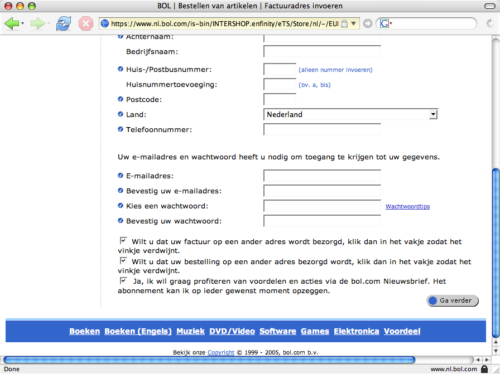
Iets waar je tijdens het online kopen van een boek op zondagochtend niet op voorbereid bent: breinbrekende keuzes aangeboden door een bestelformulier.

Mijn betere helft wilde graag een boek voor een vriendin bestellen (het geweldige ‘Zorg’ van Miguel Bulnes) en deze als cadeau laten bezorgen.

Bol.com had het boek op voorraad, dus werd besloten van hun diensten gebruik te maken. Van de knop “in winkelwagentje” was met “Ga verder met bestellen” de sprong naar het adresformulier snel gemaakt:

Bol.com's adresformulier

“Vul hier uw woon- of vestigingsadres in,” adviseerde Bol.com. Zo gezegd zo gedaan. De zonnige winkelervaring kwam echter tot een abrupte stilstand onderaan het formulier, waar een drietal checkboxen prijkten.

De opties die werden aangeboden stonden alledrie aan. Bij het lezen van de eerste optie ontstond grootte verwarring en frustratie:

“Wilt u dat uw factuur op een ander adres wordt bezorgd, klik dan in het vakje zodat het vinkje verdwijnt.”