UX and the aesthetics of interactivity

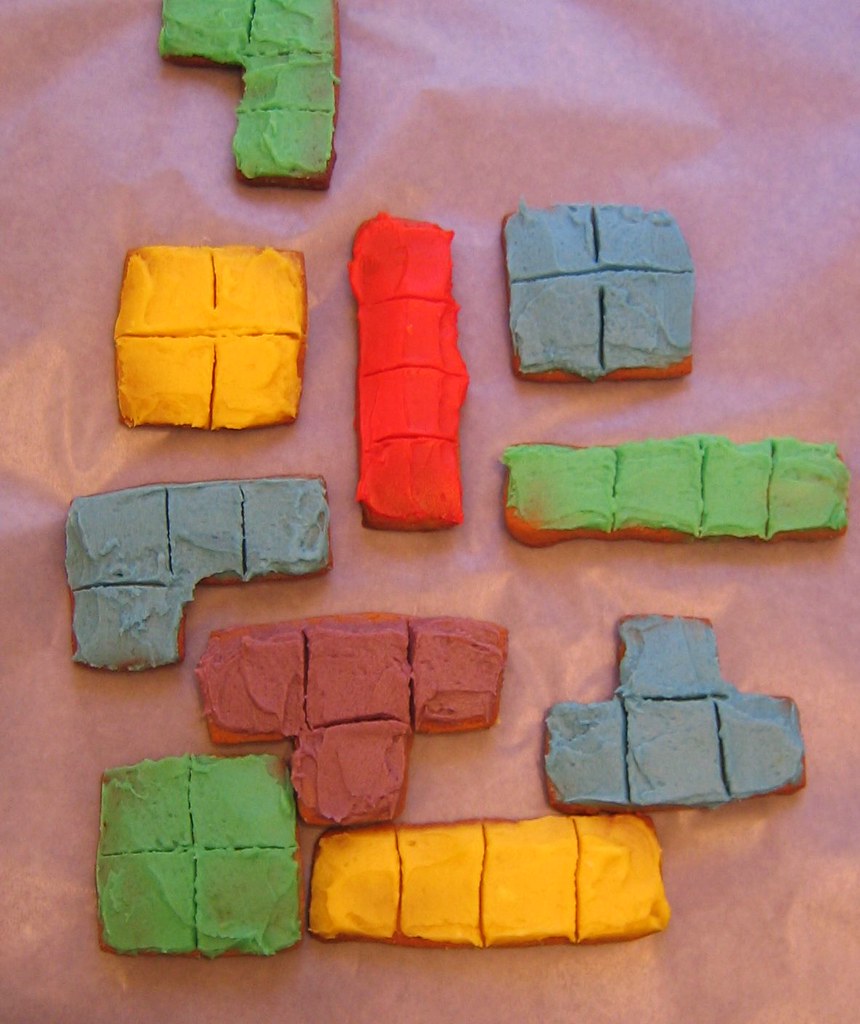
Tetris cookies

I’ve been trying to regularly post some thoughts on the topic of playful IA here. Previously I blogged about how games could be a useful frame for thinking about complex algorithmic architectures. Last week I posted some thoughts on the application of game mechanics in web apps. There, Rahul was kind enough to point me to the fascinating blog of ‘Danc’ Daniel Cook, titled Lost Garden, where there is one post in particular that resonates with my own pre-occupations lately.

In ‘Short thoughts on games and interaction design‘ (which honestly isn’t that short) Danc Cook looks at some of the ways game design techniques can be applied to the interaction design of web apps. In summary, according to Danc Cook game design techniques allow you to:

  1. Create an engaging experience that goes beyond simply completing a task efficiently.
  2. Support free and deep exploration and introduce and teach new interactions that violate conventions.

Some things you shouldn’t borrow from games without giving it a lot of thought are:

  1. Spatial metaphors
  2. Visual themes

These are some of the things most people think of first as characteristic of games but really, they are only surface, superficial, not determinant of the actual interactivity of the system.

I think one of the greatest arguments for a deeper understanding of games by interaction designers, information architects and other user experience specialists is that they are the medium that is all about the aesthetics of interactivity. It is true that they have no utilitarian character, they aim to create a pleasurable experience through systems of risks and rewards, restraints and freedoms, nested feedback loops and on and on. As a UX practitioner, it can never hurt to have a deep appreciation of the aesthetics of the medium you work in daily (beyond simply supporting user goals, or selling product, or whatever).

Game mechanics in web apps

A while ago there was a discussion on the IAI members list about game mechanics on web sites. Andrew Hinton pointed to the Google Image Labeler and LinkedIn‘s ‘profile completeness’ status bar and asked: “Can anyone else think of a use of a game mechanic like this to jump-start this kind of activity?” (Where “this kind of activity” is basically defined as something people wouldn’t normally do for its own sake, like say tagging images.)

I was thinking about this for a while the past week and seem to have ended up at the following:

Profile completeness status bar on LinkedIn

On LinkedIn, having a (more or less complete) profile presumably serves some extrinsic goal. I mean, by doing so you maybe hope you’ll land a new job more easily. By slapping a status bar onto the profile that gives feedback on its completeness, the assumption is that this will stimulate you to fill it out. In other words, LinkedIn seems unsure about the presence of extrinsic motivations and is introducing an intrinsic one: getting a 100% ‘complete’ profile and as such making a game (in a very loose sense of the term) out of its professional network service. A good idea? I’m not sure…

Screenshot of Google Image Labeler

On Google Image Labeler, the starting point for its design was to come up with a way to have people add meta-data to images. Google actually ‘bought’ the game (originally called The ESP Game) from CAPTCHA inventor Luis von Ahn, who before that did reCAPTCHA and after went on to create Peekaboom and Phetch. Anyway, in the case of the Image Labeler (contrary to LinkedIn) there was no real extrinsic goal to begin with so a game had to be created. Simply having fun is the only reason people have when labelling images.

Note that Flickr for instance has found other ways to get people to tag images. What happened there is (I think) a very nice way of aligning extrinsic goals with intrinsic (fun, game-like) ones.

‘Pure’ games by their very nature have only intrinsic goals, they are artificial and non-utilitarian. When you consider introducing game-like mechanics into your web site or application (which presumably serves some external purpose, like sharing photos) think carefully about the extrinsic motivations your users will have and come up with game-like intrinsic ones that reinforce these.

Update: Alper finished the LinkedIn profile completeness game and was disappointed to find there is no pot of gold at the end of the rainbow, mirroring the experience many players of real games have when finishing a game.

Possibility spaces and algorithmic architectures

A screenshot of Sim City.

One of the concepts I plan on exploring in my talk at the Euro IA Summit in Barcelona is ‘possibility spaces’. It’s a term used by Will Wright to describe his view of what a game can be – a space that offers multiple routes and outcomes to its explorer. That idea maps nicely with one definition of play that Zimmerman and Salen offer in Rules of Play: ‘free movement within a rigid structure’. Some examples of possibility spaces created by Wright are the well-known games Sim City and The Sims.

I think the idea of possibility spaces can help IAs to get a firmer grip on ways to realize information spaces that are multi-dimensional and (to use a term put forward by Jesse James Garrett) algorithmic. Algorithmic architectures according to Garrett are created ‘on the fly’ based on a set of rules (algorithms) that get their input (ideally) from user behaviour. The example he uses to explain this concept is Amazon.

I’ve found myself in several projects recently that would have benefited from an algorithmic approach. The hard thing is to explain its charms to clients and to get a unified vision of what it means across to the design team. I believe games might be a useful analogy. What do you think?

Reboot 9.0 day 2

(Waiting for my train home to arrive, I finally have the opportunity to post this.)

So with Reboot 9.0 and the after-party done, I think I’ll briefly write up my impressions of the second day.

Stowe Boyd – Good talk as always, offering a new definition of ‘flow’. I guess his attempt to have people open themselves up to the beneficial sides of being intermittently connected was a success.

Marko Ahtisaari – Interesting character with a good story to tell. His free mobile operator for teenagers scheme made a lot of people curious. (Free stuff always does that, it seems.)

Lee Bryant – Very fitting to the theme of human?, a touching story of how former inhabitants of a Bosnian town used social software to reconnect and rebuild the town.

Julian Bleecker – Cool stuff on new ways to interact with computing technology beyond the utilitarian and efficient, into the realm of play.

Dave Winer – An interesting character having a nice conversation with Thomas. I enjoyed his offbeat remarks and dry wit.

Guy Dickinson – Another round of micropresentations, this time with me participating. I stumbled several times. Next time I’ll prepare a custom talk for this. The other presenters were awesome.

Rasmus Fleischer and Magnus Eriksson – Two cool young anarchists with interesting ideas about file sharing and the future of music. Too bad large parts of their presentation were read from a sheet.

Leisa Reichelt – A carefully put together overview of ambient intimacy, what it is and what it’s for. Next step: coming up with design guidelines for these types of ‘tools’.

Matt Webb – Delivered on the expectations raised by his performances previous years. Interesting to see him move into experience design territory and hear his take on it. Very much applicable to my daily work in designing web services.

Dinner and the after-party were great (although it seemed that the reservations scheme had gone awry, they had no place for us at our chosen restaurant). I guess drinking and talking into the night at Vega with a lot of confused locals around was a fitting way to end another great Reboot.

See me talk on mobile social play at Reboot 9.0

I got awesome news the other day: my proposal for a talk at Reboot 9.0 has been accepted. I’m very honoured (and a little nervous) to be presenting at a conference with so many smart attendees. Now to get my act together and create a kick-ass presentation.

If you have anything related to this (pretty broad) topic that you’d want me to address, please do leave a note in the comments.

One thing’s for sure: I’ll try to build upon what has gone before at previous Reboots, such as Ben Cerveny’s mind-blowing overview (MP3) of how play is essentially becoming a new language for us to communicate with and TL Taylor’s great talk on the dynamics of virtual worlds.

What I will be addressing is still slightly unclear to me, but the direction I’m headed is:

  1. Games can be social play, which means they can be used to forge and experiment with social relations in a ‘safe’ way. This happens whether you design for it or not, but can be nurtured.
  2. When games go mobile, the borders of the space and time in which a game is played are blurred. In this way, games bleed over into culture in a gradual way.

Enough to chew on for one talk, I guess. Again, any questions, comments and suggestions are more than welcome. See you all at Reboot 9.0.

UX designers should get into everyware

I’ve been reading Adam Greenfield’s Everyware on and off and one of the things that it has me wondering the most lately is: are UX professionals making the move to design for ubiquitous computing?

There’re several places in the book where he explicitly mentions UX in relation to everyware. Let’s have a look at the ones I managed to retrieve using the book’s trusty index…

On page 14 Greenfield writes that with the emergence of ubicomp at the dawn of the new millennium, the user experience community took up the challenge with “varying degrees of enthusiasm, scepticism and critical distance”, trying to find a “language of interaction suited to a world where information processing would be everywhere in the human environment.”

So of course the UX community has already started considering what it means to design for ubicomp. This stuff is quite different to internet appliances and web sites though, as Greenfield points out in thesis 09 (pp.37-39):

“Consistently eliciting good user experiences means accounting for the physical design of the human interface, the flow of interaction between user and device, and the larger context in which that interaction is embedded. In not a single one of these dimensions is the experience of everyware anything like that of personal computing.” (p.37)

That’s a clear statement, on which he elaborates further on, mentioning that traditional interactions are usually of a “call-and-response rhythm: user actions followed by system events.” Whereas everyware interactions “can’t meaningfully be constructed as ‘task-driven.’ Nor does anything in the interplay between user and system […] correspond with […] information seeking.” (p.38)

So, UX designers moving into everyware have their work cut out for them. This is virgin territory:

“[…] it is […] a radically new situation that will require the development over time of a doctrine and a body of standards and conventions […]” (p.39)

Now, UX in traditional projects has been prone to what Greenfield calls ‘value engineering’. Commercial projects can only be two of these three things: fast, good and cheap. UX would support the second, but sadly it is often sacrificed for the sake of the other two. Not always though, but this is usually dependent on who is involved with the project:

“[…] it often takes an unusually dedicated, persistent, and powerful advocate […] to see a high-quality design project through to completion with everything that makes it excellent intact. […] the painstakingly detailed work of ensuring a good user experience is frequently hard to justify on a short-term ROI basis, and this is why it is often one of the first things to get value-engineered out of an extended development process. […] we’ve seen that getting everyware right will be orders of magnitude more complicated than achieving acceptable quality in a Web site, […] This is not the place for value engineers,” (p.166)

So if traditional projects need UX advocates on board with considerable influence, comparable to Steve Jobs’s role at Apple, to ensure a descent user experience will it even be possible to create ubiquitous experiences that are enjoyable to use? If these projects are so complex, can they be even gotten ‘right’ in a commercial context? I’m sorry to say I think not…

Designers (used broadly) will be at the forefront of deciding what everyware looks like. If you don’t think they will, at least I’m sure they should. They’re not the only ones to determine its shape though, Greenfield points out that both regulators and markets have important parts to play too (pp.172-173):

“[…] the interlocking influences of designer, regulator, and market will be most likely to result in beneficial outcomes if these parties all treat everyware as a present reality, and if the decision makers concerned act accordingly.” (p.173)

Now there’s an interesting notion. Having just come back from a premier venue for the UX community to talk about this topic, the IA Summit, I’m afraid to say that I didn’t get the impression IAs are taking everyware seriously (yet.) There were no talks really concerned with tangible, pervasive, ubiquitous or ambient technologies. Some basic fare on mobile web stuff, that’s all. Worrying, because as Greenfield points out:

“[UX designers] will best be able to intervene effectively if they develop appropriate insights, tools, and methodologies ahead of the actual deployment of ubiquitous systems.” (pp.173-174)

This stuff is real, and it is here. Greenfield points to the existence of systems such as Octopus in Hong Kong and E-ZPass in the US. Honestly, if you think beyond the tools and methods we’ve been using to communicate our designs, IxDs and IAs are well-equipped to handle everyware. No, you won’t be required to draw wireframes or sitemaps; but you’ll damn well need to put in a lot of the thinking designers do. And you’ll still need to be able to communicate those designs. It’s time to get our hands dirty:

“What fully operational systems such as Octopus and E-ZPass tell us is that privacy concerns, social implications, ethical questions, and practical details of the user experience are no longer matters for conjecture or supposition. With ubiquitous systems available for empirical enquiry, these things we need to focus on today.” (p.217)

So, to reiterate the question I started with: are there any UX designers out there that have made the switch from web-work to ubicomp? Anyone considering it? I’d love to hear about your experiences.

Spatial metaphors in IA and game design

Looking at dominant metaphors in different design disciplines I’m in some way involved in, it’s obvious to me that most are spatial (no surprises there). Here’s some thoughts on how I think this is (or should be) changing. Information architecture tends to approach sites as information spaces (although the web 2.0 hype has brought us a few ‘new’ ones, on which more later.) I do a lot of IA work. I have done quite a bit of game design (and am re-entering that field as a teacher now.) Some of the designers in that field I admire the most (such as Molyneux and Wright) approach games from a more or less spatial standpoint too (and not a narrative perspective, like the vast majority do). I think it was Molyneux who said games are a series of interesting choices. Wright tends to call games ‘possibility spaces’, where a player can explore a number of different solutions to a problem, more than one of which can be viable.

I don’t think I’m going anywhere in particular here, but when looking at IA again, as I just said, the field is currently coming to terms with new ways of looking at the web and web sites; the web as a network, web as platform, the web of data, and so on. Some of these might benefit from a more procedural, i.e. game design-like, stance. I seem to remember Jesse James Garrett giving quite some attention to what he calls ‘algorithmic architecture’ (using Amazon as an example) where the IA is actually creating something akin to a possibility space for the user to explore.

Perhaps when we see more cross-pollination between game design and information architecture and interaction design for the web, we’ll end up with more and more sites that are not only more like desktop applications (the promise of RIA’s) but also more like games. Wouldn’t that be fun and interesting?

Using concept models to design for the web of data

Flickr concept model by mApplogic

I’m lucky enough to be doing some concepting and interaction design work for a social web site. This presented me with the opportunity to integrate some stuff I found while reading on social software, and the web as platform/network. Here’s how I’ve been integrating some of it.

I was inspired by the concept model of the Flickr ecosystem I saw in Luke Wroblewski’s presentation on social interaction design (which was done by Bryce Glass) to try and create one myself. Coincidentally there’s a whole chapter in Dan Brown’s book (which Peter was smart enough to purchase and was lying around the office) on creating concept models.

One of the things I wanted to do is make the site play nice with the web of data. To that end, I decided to apply Tom Coates’ 3 basic page types to the design of the site. So what I did was first create a concept model (of course following some research of the site’s business and user goals) and then look at the nouns and verbs in the model. For each noun I created a single object view page and a list view page. For each verb I created a manipulation interface page. Of course, all list type pages would get RSS feeds in the eventual site.

For instance if you have a model that states ‘Reviewer rates Book’ then you’d end up with a page for each reviewer and book, a page to list reviewers, a page to list books and a manipulation interface for rating a book.

Doing this resulted in a nice list of pages that I could then analyse for completeness and/or redundancy. Of course this only works if your concept model accurately reflects what the site should achieve. If your model sucks, your list of pages will too.

Another caveat lies in the fact that a concept model tends to be very effective for mapping the functional aspects of a site, but not very suitable for creating an overview of its content (which is often more push oriented). If the kind of site you’re creating involves more information architecture than interaction design you might want to do some additional content inventory work and fold that into the page list.

One last challenge would be organizing these pages in a coherent whole (beyond coupling lists to single items to interfaces). I can imagine I’d attempt some card sorting to achieve that.

Finally, for creating the concept model I used the specialized (and free) tool CmapTools which is pretty nice in that it goes beyond visually modelling the concepts but actually tracking the statements you implicitly make when linking concepts to each other.

Anyone else have experience with trying to integrate some of the stuff Coates was talking about in their design of a site?

Three cool projects out of the Art, Media and Technology faculty

So a week ago I visited a project market at the Art, Media and Technology faculty in Hilversum which is part of the Utrecht School of Arts and offers BA and MA courses in Interaction Design, Game Design & Development and many others.

The range of projects on show was broad and wonderfully presented. It proves the school is still able to integrate arts and crafts with commercial and societal relevant thinking. All projects (over 40 in total) were by master of arts students and commissioned by real world clients. I’d like to point out three projects I particularly enjoyed:

Koe

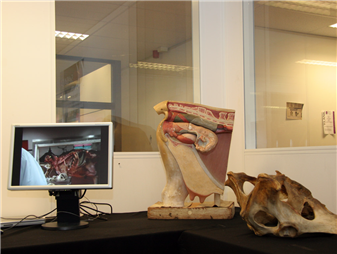
A tangible interface that models a cow’s insides and allows veterinary students to train at much earlier stage than they do now. The cow model has realistic organs made of silicon (echoes of Realdoll here) and is hooked up to a large display showing a 3D visualization of the student’s actions inside the cow. Crazy, slightly gross but very well done.

Haas

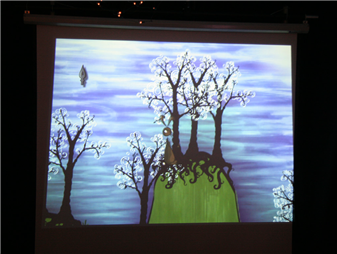
A narrative, literary game called ‘Haas’ (Dutch for hare) that allows the player to intuitively draw the level around the main character. The game’s engine reminded me a bit of Chris Crawford‘s work in that it tracks all kinds of dramatic possibilities in the game and evaluates which is the most appropriate at any time based on available characters, props, etc. Cute and pretty.

Entertaible

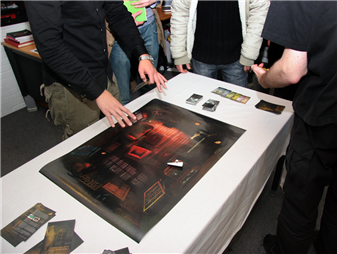
A game developed for Philips’ Entertaible which is a large flat panel multi-touch display that can track game pieces’ location, shape and orientation and has RFID capabilities as well. The game developed has the players explore a haunted mansion (stunningly visualized by the students in a style that is reminiscent of Pixar) and play a number of inventive mini-games. Very professionally done.

For a taste of the project market you can check out this photo album (from which the photos in this post are taken) as well as this video clip by Dutch newspaper AD.

Full disclosure: I currently teach a course in game design for mobile devices and earlier studied interaction and game design between 1998 and 2002 at the same school.

iPhone

iPhone playing The Office

There have been so many posts on the iPhone lately that I’ll try not to add to the noise with things that have already been said. Web designer Jeremy Keith and interaction designer Dan Saffer have both tried to gather all the worthwhile posts on the topic, from differing perspectives. I’m sure they’ll make for plenty of (more or less interesting) reading.

My own view is that Apple have proven once again that they’re great at integrating tech that was already out there in a package that offers a pleasing user experience. I’m curious about the multi-touch screen and the apparent gestural and tangible interaction it offers. I’m underwhelmed by their choice to have the device work only with Cingular (which apparently is kind of crap) and am curious if they’ll do the same when it’s introduced on this side of the ocean.

In short: I’ll have to actually use the thing to decide whether it’s as good as it seems; it’ll come down to not just the UI, but also the performance of the GSM, WiFi, camera, and on and on. For now, I’m having fun watching the online demos (at least that’s one thing Apple is very good at).