Chris Crawford on design suggestions

I have a considerable amount of books with dog-eared pages lying around the office. One such book is The Game Design Reader, which contains a large and varied collection of essays on (yes) game design. This book probably has the largest number of dog-ears. Partly because it is quite thick, but also because it is filled to the brim with good stuff.

One essay is written by Chris Crawford. He is without a doubt one of the best known game designers out there, a real veteran of the industry. He is also a controversial character, often voicing unpopular opinions. I guess you could call him an iconoclast.

This iconoclasm shines through in his essay for TGDR. Crawford shares the story behind the design of Eastern Front (1941) his “first big hit”. Towards the end, he devotes some attention to game tuning, and has this to say about how you as a designer should approach suggestions from others:1

“Your job is to build a great design, not gratify your co-workers.”

According to him, a good designer has thought the system through so thoroughly, that the vast majority of suggestions have already passed through his mind. Therefore, these can all be rejected without much thought. If you are swamped with suggestions you have not thought of before, this is an indication you have not properly done your job.

I can only agree, but I think the real challenge is in rejecting these ideas in a persuasive manner. It is hard to make apparent the fact that you have thought all these things through.

One strategy I am pursuing is to be radically transparent in my process. I try to document every single consideration using quick and dirty sketches, and share all of these. This way, I hope to make apparent the thinking that has gone into the design.

What Chris Crawford makes clear is that design isn’t a popularity contest:2

“This isn’t noble; it’s stupid. Seriously considering every idea that drifts by isn’t a sign of open mindedness; it’s an indicator of indecisiveness. […] Be courteous, but concentrate on doing your job.”

Some time ago, Crawford more or less turned his back on the games industry and focussed his attention on the thorny problem of interactive storytelling. The outcomes of this are finally seeing the light of day in the shape of Storytron; a company that offers a free authoring tool as well as ready-to-play ‘storyworlds’.

I wasn’t too impressed with the interaction design of the authoring tool, but the concept remains intriguing. We’ll see where it goes.

If this has piqued your curiosity; Chris Crawford will be speaking at IDEA 2008 in Chicago, 7–8 October. Reason enough to attend, in my humble opinion.

  1. Page 723 []
  2. Ibid. []

Sketching in code — Twitter, Processing, dataviz

Sketching is the defining activity of design writes Buxton and I tend to agree. The genius of his book is that he shows sketching can take on many forms. It is not limited to working with pencils and paper. You can sketch in 3D using wood or clay. You can sketch in time using video, etc. Buxton does not include many examples of sketching in code, though.1 Programming in any language tends to be a hard earned skill, he writes, and once you have achieved sufficient mastery in it, you tend to try and solve all problems with this one tool. Good designers can draw on a broad range of sketching techniques and pick the right one for a given situation. This might include programming, but then it would need to conform to Buxton’s defining characteristics of sketching: quick, inexpensive, disposable, plentiful, offer minimal detail, and suggest and explore rather than confirm.

I have been spending some time broadening my sketching repertoire as a designer. Before I started interaction design I was mostly into visual arts (drawing, painting, comics) so I am quite comfortable sketching in 2D, using storyboards, etc.2 Sketching in code though, has always been a weak spot. I have started to remedy this by looking into Processing.

As an exercise I took some data from Twitter — one data set was the 20 most recent tweets and the other my friends list — and decided to see how quick I could create a few different visualizations of that data. The end results were:

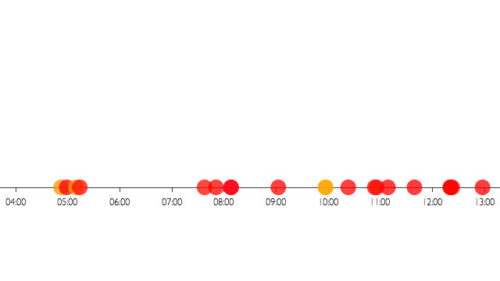
Today's start - timeline

one: a timeline that spatially plots the latest tweets from my friends — showing density at certain points in time; or how ‘noisy’ it is on my Twitter stream,

Neatly centred now

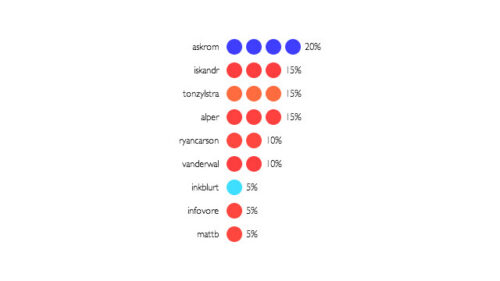
two: an ordering of friends based on the percentage of their tweets that take up my timeline — who’s the loudest of my friends?,

Bugfix – made a mistake in the tick mark labels

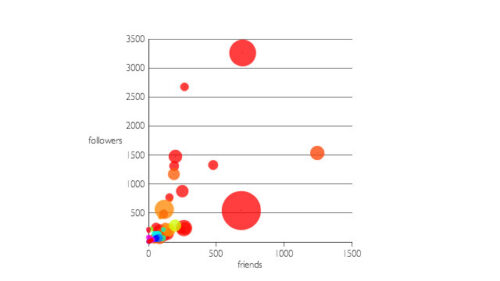
three: a graph of my friends list, with number of friends and followers on the axes and their total number of tweets mapped to the size of each point.

The aim was not to come up with groundbreaking solutions, or finished applications.3 The goal was to exercise this idea of sketching in code and use it to get a feel for a ‘complex’ data set, iterating on many different ways to show the data before committing to one solution. In a real-world project I could see myself as a designer do this and then collaborate with a ‘proper’ programmer to develop the final solution (which would most likely be interactive). I would choose different sketching techniques to design the interactive aspects of a data-visualization. For now I am content with Processing sketches that simply output a static image.

Tools & resources used were:

If as a designer you are confronted with a project that involves making a large amount of data understandable, sketching in code can help. You can use it to ‘talk’ to the data, and get a sense of its ‘shape’.

  1. There is one involving Phidgets and Max/MSP, a visual programming solution for physical computing. []
  2. Some examples include a multi-touch project I did for InUse and a recent presentation at TWAB 2008. []
  3. I don’t think any of these visualizations are very profound, they’re interesting at best. []

Sketching the experience of toys

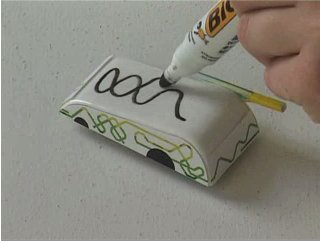
A frame from the Sketch-A-Move video

“Play is the highest form of research.”

—Albert Einstein1

That’s what I always say when I’m playing games, too.

I really liked Bill Buxton‘s book Sketching User Experiences. I like it because Buxton defends design as a legitimate profession separate from other disciplines—such as engineering—while at the same time showing that designers (no matter how brilliant) can only succeed in the right ecosystem. I also like the fact that he identifies sketching (in its many forms) as a defining activity of the design profession. The many examples he shows are very inspiring.

One in particular stood out for me, which is the project Sketch-A-Move by Anab Jain and Louise Klinker done in 2004 at the RCA in London. The image above is taken from the video they created to illustrate their concept. It’s about cars auto-magically driving along trajectories that you draw on their roof. You can watch the video over at the book’s companion website. It’s a very good example of visualizing an interactive product in a very compelling way without actually building it. This was all faked, if you want to find out how, buy the book.2

The great thing about the video is not only does it illustrate how the concept works, it also gives you a sense of what the experience of using it would be like. As Buxton writes:3

“You see, toys are not about toys. Toys are about play and the experience of fun that they help foster. And that is what this video really shows. That, and the power of video to go beyond simply documenting a concept to communicating something about experience in a very visceral way.”

Not only does it communicate the fun you would have playing with it, I think this way of sketching actually helped the designers get a sense themselves of wether what they had come up with was fun. You can tell they are actually playing, being surprised by unexpected outcomes, etc.

The role of play in design is discussed by Buxton as well, although he admits he needed to be prompted by a friend of his: Alex Manu, a teacher at OCAD in Toronto writes in an email to Buxton:4

“Without play imagination dies.”

“Challenges to imagination are the keys to creativity. The skill of retrieving imagination resides in the mastery of play. The ecology of play is the ecology of the possible. Possibility incubates creativity.”

Which Buxton rephrases in one of his own personal mantras:5

“These things are far too important to take seriously.”

All of which has made me realize that if I’m not having some sort of fun while designing, I’m doing something wrong. It might be worth considering switching from one sketching technique to another. It might help me get a different perspective on the problem, and yield new possible solutions. Buxton’s book is a treasure trove of sketching techniques. There is no excuse for being bored while designing anymore.

  1. Sketching User Experiences p.349 []
  2. No, I’m not getting a commission to say that. []
  3. Ibid. 1, at 325 []
  4. Ibid., at 263 []
  5. Ibid. []

Pollinator — a casual game prototype made with Mobile Processing

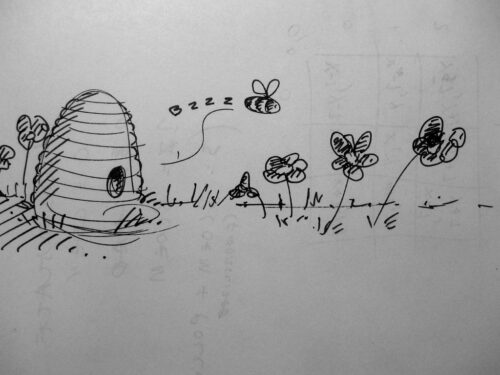
I wrote a game about a bee and flowers today

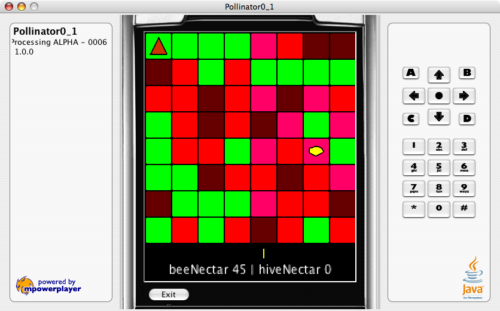
Last sunday I sat down and coded a prototype of a casual game in Mobile Processing. I got the idea for it the evening before: You’re a bee who needs to collect as much honey as possible in his hive while at the same time keeping a flower-bed blooming by pollinating… Play it and let me know what your high score is in the comments!

Thinking and making

I’ve been looking for an excuse to get some experience with Processing (particularly the variant suitable for developing mobile stuff) for a while. I also felt I needed to get back into the making part of the field I’ve been thinking about so much lately: Game Design. I agree with Saffer, Webb and others – making is an important part of the design practice, it cannot be replaced by lots of thinking. The things learnt from engaging with the actual stuff things are made of (which in the case of digital games is code) aren’t gained in any other way and very valuable.

Get the game

I’ve uploaded the first version of the game here. You can play it in the emulator in your browser or if your phone runs Java midlets, download the file and play it like you’re supposed to: While out and about. The source code is provided as well, if you feel like looking at it.1

Pollinator 0.1

How to play

You’re the yellow oval. The orange triangle in the top left corner is your hive. Green squares are grass, brown squares are seeds, red squares are flowers and pink squares are pollinated flowers. The field is updated in columns from left to right (indicated by the yellow marker in the bottom). A seed will turn into a flower (in rare cases a pollinated flower). A flower will die, a pollinated flower will die and spread seeds to grass around it. Move your bee with the directional keys, use the centre key to grab nectar from a flower. You can cary a maximum of 100 nectar. Drop your nectar off at the hive (again using the centre key) to up your score. When you first grab nectar from a pollinated flower and subsequently from a normal flower, the latter is pollinated. Try to keep the flower-bed in bloom while at the same time racking up a high-score!

You’ll get 10 nectar from a flower (in bloom or not). Pollinating a flower costs 5 nectar. If you try to take nectar more than once from the same flower, you’ll loose 10 nectar.2

Improvements

Stuff not in here that I might put into a next version (whenever I get around to it):

  • Animation — I need to get my feet wet with some scripted animation. Thing is I’ve always sucked at this. For now it’s all tile-based stuff.
  • Better feedback — For instance show the points you earn near the bee and the hive. I think that’ll make the game a lot easier to understand and therefore more fun.
  • Menus, pause, game over — It’s a prototype, so you get dumped into the action right away. (The game starts on the first key you press.) And there’s no actual game over message, the field just turns green and you’re left to wonder what to do.
  • Balance — I’m not sure if the game like it stands is balanced right, I will need to play it a lot to figure that out. Also there’s probably a dominant strategy that’ll let you rack up points easily.

The aim was to create a relatively casual game experience that will almost allow you to zone out while playing. I think it is far too twitchy now, so perhaps I really should sit down and do a second version sometime soon.

Mobile Processing

I enjoy working with Mobile Processing. I like the way it allows you to program in a very naive way but if you like structure things in a more sophisticated fashion. It really does allow you to sketch in code, which is exactly what I need. The emphasis on just code also prevents me from fiddling around with animations, graphics and so on (like I would in Flash for instance.) Perhaps the only thing that would be nice is an editor that is a bit more full-featured.3 Perhaps I should grab an external editor next time?

Feedback

If you played the game and liked it (or thought it was too hard, boring or whatever) I’d love to get your feedback in the comments. Anyone else out there prototyping games in Processing? Or using it to teach game design? I’d be very interested to hear about it.

  1. Not that it’s particularly good, I’m an amateur coder at best. []
  2. I’m not sure this is the right kind of negative reinforcement. []
  3. The automatic code formatting refused to work for me, requiring me to spend a bit too much effort on formatting by hand. []

Learning about emergence from games

A game of Go

I’m still trying to get a grip on why I think games are such a good reference point for IAs and IxDs. I’ll try to take another stab at it in this post. Previously I wrote about how games might be a good way to ‘sell’ algorithmic architectures to your client. Even if you’re not actively pushing your clients to adopt ideas such as on-the-fly creation of site navigation, sooner or later I’m convinced you’ll find yourself confronted with a project where you’re not asked to develop a definitive information architecture. Instead you’ll be charged with the task to come up with mechanisms to generate these procedurally. When this is this case, you’re truly facing a second-order design problem. How can games help here?

One of the defining characteristics of games are their complexity. A few years ago Ben Cerveny gave a brilliant talk on play (MP3) at Reboot 7.0 and mentioned this specifically — that much of the pleasure derived from game-play is the result of the player coming to terms with complex patterns. This complexity is something different from pure randomness and most certainly different from a ‘mere’ state machine. In other words, games show emergence.

There are many examples of emergent systems. The Game of Life springs to mind. This system isn’t really a game but shows a remarkable richness in patterns, despite (or maybe because of) the fact that it is based on a set of deceptively simple rules (which apparently took its creator, John Conway, over 2 years to perfect!) The thing is though, The Game of Life is not interactive.

A wonderful example of a complex emergent system that is interactive is the real game Go. It has a set of very simple rules, but playing it well takes a huge amount of practice. The joy of playing Go for me (an absolute beginner) is largely due to discovering the many different permutations play can go through.

So getting back to my earlier remark: If you’re convinced you’ll need to get a better handle on solving the second-order design problems presented by the design of complex emergent systems, games are an excellent place to start learning. They are emergent first and interactive second, the perfect twin to the web environments we’ll be shaping in the future.

UX designers should get into everyware

I’ve been reading Adam Greenfield’s Everyware on and off and one of the things that it has me wondering the most lately is: are UX professionals making the move to design for ubiquitous computing?

There’re several places in the book where he explicitly mentions UX in relation to everyware. Let’s have a look at the ones I managed to retrieve using the book’s trusty index…

On page 14 Greenfield writes that with the emergence of ubicomp at the dawn of the new millennium, the user experience community took up the challenge with “varying degrees of enthusiasm, scepticism and critical distance”, trying to find a “language of interaction suited to a world where information processing would be everywhere in the human environment.”

So of course the UX community has already started considering what it means to design for ubicomp. This stuff is quite different to internet appliances and web sites though, as Greenfield points out in thesis 09 (pp.37-39):

“Consistently eliciting good user experiences means accounting for the physical design of the human interface, the flow of interaction between user and device, and the larger context in which that interaction is embedded. In not a single one of these dimensions is the experience of everyware anything like that of personal computing.” (p.37)

That’s a clear statement, on which he elaborates further on, mentioning that traditional interactions are usually of a “call-and-response rhythm: user actions followed by system events.” Whereas everyware interactions “can’t meaningfully be constructed as ‘task-driven.’ Nor does anything in the interplay between user and system […] correspond with […] information seeking.” (p.38)

So, UX designers moving into everyware have their work cut out for them. This is virgin territory:

“[…] it is […] a radically new situation that will require the development over time of a doctrine and a body of standards and conventions […]” (p.39)

Now, UX in traditional projects has been prone to what Greenfield calls ‘value engineering’. Commercial projects can only be two of these three things: fast, good and cheap. UX would support the second, but sadly it is often sacrificed for the sake of the other two. Not always though, but this is usually dependent on who is involved with the project:

“[…] it often takes an unusually dedicated, persistent, and powerful advocate […] to see a high-quality design project through to completion with everything that makes it excellent intact. […] the painstakingly detailed work of ensuring a good user experience is frequently hard to justify on a short-term ROI basis, and this is why it is often one of the first things to get value-engineered out of an extended development process. […] we’ve seen that getting everyware right will be orders of magnitude more complicated than achieving acceptable quality in a Web site, […] This is not the place for value engineers,” (p.166)

So if traditional projects need UX advocates on board with considerable influence, comparable to Steve Jobs’s role at Apple, to ensure a descent user experience will it even be possible to create ubiquitous experiences that are enjoyable to use? If these projects are so complex, can they be even gotten ‘right’ in a commercial context? I’m sorry to say I think not…

Designers (used broadly) will be at the forefront of deciding what everyware looks like. If you don’t think they will, at least I’m sure they should. They’re not the only ones to determine its shape though, Greenfield points out that both regulators and markets have important parts to play too (pp.172-173):

“[…] the interlocking influences of designer, regulator, and market will be most likely to result in beneficial outcomes if these parties all treat everyware as a present reality, and if the decision makers concerned act accordingly.” (p.173)

Now there’s an interesting notion. Having just come back from a premier venue for the UX community to talk about this topic, the IA Summit, I’m afraid to say that I didn’t get the impression IAs are taking everyware seriously (yet.) There were no talks really concerned with tangible, pervasive, ubiquitous or ambient technologies. Some basic fare on mobile web stuff, that’s all. Worrying, because as Greenfield points out:

“[UX designers] will best be able to intervene effectively if they develop appropriate insights, tools, and methodologies ahead of the actual deployment of ubiquitous systems.” (pp.173-174)

This stuff is real, and it is here. Greenfield points to the existence of systems such as Octopus in Hong Kong and E-ZPass in the US. Honestly, if you think beyond the tools and methods we’ve been using to communicate our designs, IxDs and IAs are well-equipped to handle everyware. No, you won’t be required to draw wireframes or sitemaps; but you’ll damn well need to put in a lot of the thinking designers do. And you’ll still need to be able to communicate those designs. It’s time to get our hands dirty:

“What fully operational systems such as Octopus and E-ZPass tell us is that privacy concerns, social implications, ethical questions, and practical details of the user experience are no longer matters for conjecture or supposition. With ubiquitous systems available for empirical enquiry, these things we need to focus on today.” (p.217)

So, to reiterate the question I started with: are there any UX designers out there that have made the switch from web-work to ubicomp? Anyone considering it? I’d love to hear about your experiences.

Gift outcompetes exchange in design too

I just finished Eric Steven Raymond’s Homesteading the Noosphere. It’s a terrific read for anyone looking for a thorough look at the inner workings of the open source software development community. Like others, whenever reading this kind of stuff sooner or later apophenia hits and I try to tie bits to my own discipline, which isn’t programming but design.

In one of the last chapters of the essay (titled Gift Outcompetes Exchange). Raymond offers some tantalising insights into the relationships between doing complex creative work, motivation, and reward. While reading it I recognised a lot of ideas that I’ve long felt are important but could never really articulate. Now I finally have some great quotes, and (over 10 year old) research to back it up!

Psychologist Theresa Amabile of Brandeis University, cautiously summarizing the results of a 1984 study of motivation and reward, observed “It may be that commissioned work will, in general, be less creative than work that is done out of pure interest.”. Amabile goes on to observe that “The more complex the activity, the more it’s hurt by extrinsic reward.” Interestingly, the studies suggest that flat salaries don’t demotivate, but piecework rates and bonuses do.

Thus, it may be economically smart to give performance bonuses to people who flip burgers or dug ditches, but it’s probably smarter to decouple salary from performance in a programming shop and let people choose their own projects (both trends that the open-source world takes to their logical conclusions). Indeed, these results suggest that the only time it is a good idea to reward performance in programming is when the programmer is so motivated that he or she would have worked without the reward!

Other researchers in the field are willing to point a finger straight at the issues of autonomy and creative control that so preoccupy hackers. “To the extent one’s experience of being self-determined is limited,” said Richard Ryan, associate psychology professor at the University of Rochester, “one’s creativity will be reduced as well.”

So a team of designers working in the mode Raymond describes would choose their own projects and not be rewarded for their performance on projects (which is usually measured in efficiency and client satisfaction). In stead, to really keep them motivated, they’d be given a large amount of autonomy (and wouldn’t be instructed on which problems to solve and how to go about it). Of course, this only works with skilled workers, but I don’t think that’s the reason these philosophies haven’t been applied to design work on the scale they have been in programming. I think a lot of resistance for actually allowing designers work like this in a commercial setting are related to a fear of giving up control. Later on Raymond finishes the chapter with:

Indeed, it seems the prescription for highest software productivity is almost a Zen paradox; if you want the most efficient production, you must give up trying to make programmers produce. Handle their subsistence, give them their heads, and forget about deadlines. To a conventional manager this sounds crazily indulgent and doomed—but it is exactly the recipe with which the open-source culture is now clobbering its competition.

When will the first examples appear of design done in this way? When will the first projects pop up that outcompete the cathedral style designs process (or are they already among us)? Are there any designers out there actually working in this way? I’d love to hear from you.

Update: I changed the link to Flickr into one pointing to a post by Tom Coates on how Flickr was built.

On presentations

One of the most enjoyable things about attending conferences is seeing a lot of people presenting in various ways. A while ago I challenged my own presenting skills by doing a Pecha Kucha. Today, I attended a class (part of a didactics course) on giving lectures. Two prominent lecturers (Giep Hagoort and Jeroen van Mastrigt) from within the Utrecht School of Arts gave us a taste of their own unique presentation format and the way they prepared for a talk.

This triggered some things in my head, such as stuff I’d seen before on the web and that could be helpful to the people attending the class. A lot of them didn’t seem to be too familiar with it, so I’ve decided to collect them here. Maybe they’ll come in handy to those who pass by here:

My Mobile Game Directions Pecha Kucha

Yesterday I presented my talk on mobile gaming at the 6th Pecha Kucha Night in Rotterdam’s Off_Corso. I was programmed as the first speaker, which was exciting (and also allowed me to benefit from the primacy effect, as my girlfriend pointed out). Colleague Iskander was kind enough to record the whole thing on his N70 (fittingly) and I present it here for your enjoyment or aggravation, whichever you prefer (please take note that the talk is in Dutch). The slides I used are over at SlideShare.

I’m still not sure the subject matter was appropriate for the event, considering the majority of speakers were either graphic designers, autonomous artists or architects. The crowd might’ve been a bit underwhelmed by my commercial and pop cultural references. Oh well, I had fun, I guess that’s the most important thing.

Many thanks to Nadine and Bart of Hunk Design for letting me loose on stage. ‘Nuff respect to all the presenters for taking the trouble of preparing a presentation. There were plenty of cool and inspiring ideas on show. Finally, thanks to the creators of all the images I used, you can find the credits in the SlideShare show.

Update: I’ve deleted my YouTube account so here’s an embed of the video on Vimeo: