-
Blunder van Yahoo!; ze zouden beter moeten weten dan de CC licenties van Flickr gebruikers te negeren.
-
A wiki where a community is trying to write a novel. Interesting and exciting, I wonder how it will turn out. Via Harm.
links for 2007-02-02
-
Apparently an important article that classifies MUD players into four types and then goes on to discuss how a MUD can be tilted to favour one or more of them. Readily applicable to other types of multi-user environments.
-
A site that collects stencils for the lovely diagramming tool OmniGraffle. Includes plenty of IA and IxD stencils.
-
Todd Warfel of Messagefirst describes his framework for wireframing using Illustrator and Indesign from Adobe. I wouldn’t go this route because of the generic nature of the software but still a good read.
-
A description of how a library web site was gradually redesigned using web 2.0 tools and philosophy.
-
Another interview with Greenfield. An interesting read because now it’s been a while since he published Everyware and the hype has died down a little.
-
This new PSP game might just have me buying the damn thing together with Lumines and LocoRoco.
-
Fierce discussion on the nature of IxD following the RCA’s change of course (from Interaction Design to Design Interactions).
-
Criticism of the latest RCA summer show: “The work on show was more concerned with the impact of biotechnology on society than on the craft of design […] there was nothing there to actually interact with.”
Three cool projects out of the Art, Media and Technology faculty
So a week ago I visited a project market at the Art, Media and Technology faculty in Hilversum which is part of the Utrecht School of Arts and offers BA and MA courses in Interaction Design, Game Design & Development and many others.
The range of projects on show was broad and wonderfully presented. It proves the school is still able to integrate arts and crafts with commercial and societal relevant thinking. All projects (over 40 in total) were by master of arts students and commissioned by real world clients. I’d like to point out three projects I particularly enjoyed:
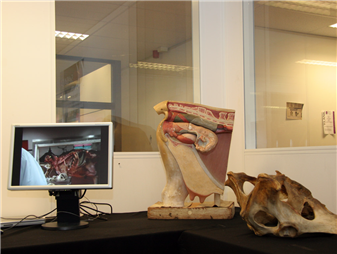
A tangible interface that models a cow’s insides and allows veterinary students to train at much earlier stage than they do now. The cow model has realistic organs made of silicon (echoes of Realdoll here) and is hooked up to a large display showing a 3D visualization of the student’s actions inside the cow. Crazy, slightly gross but very well done.
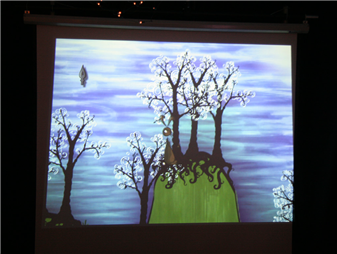
A narrative, literary game called ‘Haas’ (Dutch for hare) that allows the player to intuitively draw the level around the main character. The game’s engine reminded me a bit of Chris Crawford‘s work in that it tracks all kinds of dramatic possibilities in the game and evaluates which is the most appropriate at any time based on available characters, props, etc. Cute and pretty.
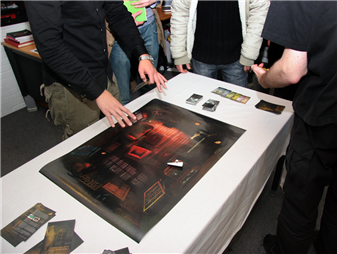
A game developed for Philips’ Entertaible which is a large flat panel multi-touch display that can track game pieces’ location, shape and orientation and has RFID capabilities as well. The game developed has the players explore a haunted mansion (stunningly visualized by the students in a style that is reminiscent of Pixar) and play a number of inventive mini-games. Very professionally done.
For a taste of the project market you can check out this photo album (from which the photos in this post are taken) as well as this video clip by Dutch newspaper AD.
Full disclosure: I currently teach a course in game design for mobile devices and earlier studied interaction and game design between 1998 and 2002 at the same school.
links for 2007-01-30
-
Found this a while back and am still using it (albeit slightly tweaked; I’m not using a circle but an auto-sizing rounded box). Handy for quick first pass annotations.
links for 2007-01-27
-
I do think Will Wright’s new game will sell. Maybe not as much as The Sims, but certainly more than Black & White. Time will tell…
-
A look at Intuitect, IxD and IA software which sounds pretty good. It’s an add-on for Visio, which I actually don’t like, because I’ve never liked working in it (although I do it a lot).
-
A piece on strategies for coping with too many connections in your social network, both cultural and technical. It’s clear there’s no easy solution for managing a large social network.
-
“in any group process look for the commons, allow participants to participate in identifing defectors; determine what the costs are for such identification […] and encourage participation in the common good by punishing those who do not participate in s
-
A piece on how humans have a need to feel like they belong to a group and how they can have relationships with fictitious persons (para-social relationships). This can influence the amount of ‘real-world’ contacts you are able to keep track of.
-
Analysis of group sizes in World of Warcraft and other MMOGs. Difference in size suggests different costs of maintaining relationships and returns from being part of a group.
-
More analysis of groups in MMOGs: “keeping a large group cohesive requires significantly more time in social “grooming”.”
links for 2007-01-25
-
An interview with designer and developer of Delicious Library, a pretty neat piece of media library management software. The article includes images of early UI designs.
Google Reader improvements

I hadn’t touched Google Reader since taking a brief look at its initial launch in October 2005. I’m now using it as my primary reader, having grown tired of Rojo‘s poor performance and frequent interface overhauls. There’s a few things that have really improved since that first release. I’ll sum them up briefly here:
- Uncluttered, simple interface. They’ve gone back to basics and mimic a plain desktop application UI. Hardly any superfluous web 2.0 features demand your attention.
- Trends page (I’ve bookmarked a few articles on this); which allows you to look at the feeds you’ve been reading the most but, more importantly, allow you to weed out the ones you never look at or have died. Essential for someone who has over 200 feeds to track.
- Multi-folder organising, not quite free tagging (which is a shame) but still nice for the folksonomically inclined.
- When scrolling through a list of expanded new feed items, Reader automatically marks items you’ve scrolled past as read. Which greatly reduces the excise other web-based readers force on their users when wanting to mark a feed as read.
- Performance is acceptable to good. It’s not as fast as Gmail, but vastly superior to Rojo for instance, despite the considerable use of AJAX.
- There is an unofficial Mac OS X notifier that uses Growl.
Most of these features are not included in one or both of the previous two web-based readers I used for a length of time (Bloglines and Rojo). Google have really come up with something nice here. I wonder when it’ll move out of the lab.
Why am I not using a desktop based reader? I’d like to (NetNewsWire‘s great for instance), just as I’d love to use a proper desktop email client, but my multi-platform, multi-machine personal and professional use doesn’t allow me too. I work on at least two separate PCs at work (a desktop and a laptop) and have a cute little iBook that I use at home. This all means I am a real web OS user. Firefox as browser (with Google Browser Sync to keep it the same across all installs), Google Reader for RSS, Gmail for email and (until recently) Google Calendar for, well, my calendar. Is it coincidence I seem to prefer Google products for these things? Probably not, Google seems to be doing a very good job at these kind of productivity applications (just as Yahoo! seem to be leading the way in social applications).
links for 2007-01-24
-
A handy tutorial on how to configure Handbrake to rip DVDs for use on an iPod Video.
links for 2007-01-23
-
“Web 2.0 is a massive social experiment, and like any experiment worth trying, it could fail. There’s no road map for how an organism that’s not a bacterium lives and works together on this planet in numbers in excess of 6 billion.”
-
A *large* presentation by Brian Fling. Mostly just slides with no annotations, but still good to skim for ideas and a sense of what’s important in mobile web design.
-
Old but good post that offers the beginnings of a framework of online game player’s motivations.
-
First in a series of posts by Christopher Allen on how the Dunbar number can be applied to online communities. Enlightening.
-
Report by Peter Bogaards on an event I helped organize but sadly could not attend. The Web and Beyond was a web 2.0 event by CHI professionals for designers, marketeers and business people.
links for 2007-01-19
-
Khoi Vin, who once did a killer B&A redesign (that didn’t get done) doesn’t like the site’s new design. I agree, and would like to add that a site like this can’t afford to not include a decent print stylesheet…
-
I recently switched to Google Reader. Until I write a blog post about it, here’s a piece on one of the features I like: personalized feed reading trends.
-
Veen on his work for Google Reader – the new trends page: “this serves as a good example of collecting and understanding the ambient information that flows through our digital lives.”
-
“This is going to be one of the great benefits of ambient/pervasive computing or everyware – not the tracking of objects but the tracking and collating of you yourself through objects.”
-
Nielsen explains the benefits of progressive and staged disclosure.
-
Régine Debatty reviews a documentary film on underground pop culture created with and through games.
-
Good stuff on the use and components of recommendation engines, pointing to some new directions that can be investigated.
-
Short but sweet post on WIkiseek; a search engine that restricts it’s search to Wikipedia pages and pages directly linked to from the Wikipedia.
-
A review of Mind Hacks and an interview with Matt Webb. I would love to see him write the Persuasive Hacks book he mentions.
-
A piece on the different laws that apply to different types of networks and their sizes.
-
IxD guru and Apple veteran Tognazzini takes a look at the iPhone demo’s and to the surprise of many is actually quite positive: “iPhone is glorious, and it is only the beginning.”
-
A piece by a wiki consultant on the ways in which one can organize a wiki. The most important point he makes is: “planning organizational strategies is really not the place to put most of your energies. Rather empowering people through good tools and perh