Last Saturday I attended a RoomWare workshop. The people of CanTouch were there too, and brought one of their prototype multi-touch tables. The aim for the day was to come up with applications of RoomWare (open source software that can sense presence of people in spaces) and multi-touch. I attended primarily because it was a good opportunity to spend a day messing around with a table.
Attendance was multifaceted, so while programmers were putting together a proof-of-concept, designers (such as Alexander Zeh, James Burke and I) came up with concepts for new interactions. The proof-of-concept was up and running at the end of then day: The table could sense who was in the room and display his or her Flickr photos, which you could then move around, scale, rotate, etc. in the typical multi-touch fashion.
The concepts designers came up with mainly focused on pulling in Last.fm data (again using RoomWare’s sensing capabilities) and displaying it for group-based exploration. Here’s a storyboard I quickly whipped up of one such application:
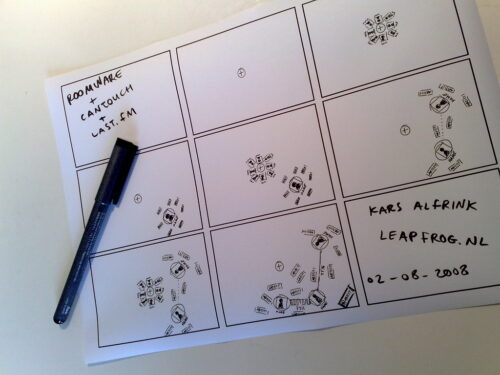
The storyboard shows how you can add yourself from a list of people present in the room. Your top artists flock around you. When more people are added, lines are drawn between you. The thickness of the line represents how similar your tastes are, according to Last.fm’s taste-o-meter. Also, shared top artists flock in such a way as to be closest to all related people. Finally, artists can be acted on to listen to music.
When I was sketching this, it became apparent that orientation of elements should follow very different rules from regular screens. I chose to sketch things so that they all point outwards, with the middle of the table as the orientation point.
By spending a day immersed in multi-touch stuff, some interesting design challenges became apparent:
- With tabletop surfaces, stuff is closer or further away physically. Proximity of elements can be unintentionally interpreted as saying something about aspects such as importance, relevance, etc. Designers need to be even more aware of placement than before, plus conventions from vertically oriented screens no longer apply. Top-of-screen becomes furthest away and therefore least prominent in stead of most important.
- With group-based interactions, it becomes tricky to determine who to address and where to address him or her. Sometimes the system should address the group as a whole. When 5 people are standing around a table, text-based interfaces become problematic since what is legible from one end of the table is unintelligible from the other. New conventions need to be developed for this as well. Alexander and I philosophized about placing text along circles and animating them so that they circulate around the table, for instance.
- Besides these, many other interface challenges present themselves. One crucial piece of information for solving many of these is knowing where people are located around the table. This issue can be approached from different angles. By incorporating sensors in the table, detection may be automated and interfaces could me made to adapt automatically. This is the techno-centric angle. I am not convinced this is the way to go, because it diminishes people’s control over the experience. I would prefer to make the interface itself adjustable in natural ways, so that people can mold the representation to suit their context. With situated technologies like this, auto-magical adaptation is an “AI-hard” problem, and the price of failure is a severely degraded user experience from which people cannot recover because the system won’t let them.
All in all the workshop was a wonderful day of tinkering with like-minded individuals from radically different backgrounds. As a designer, I think this is one of the best way be involved with open source projects. On a day like this, technologists can be exposed to new interaction concepts while they are hacking away. At the same time designers get that rare opportunity to play around with technology as it is shaped. Quick-and-dirty sketches like the ones Alexander and I came up with are definitely the way to communicate ideas. The goal is to suggest, not to describe, after all. Technologists should feel free to elaborate and build on what designers come up with and vice-versa. I am curious to see which parts of what we came up with will find their way into future RoomWare projects.
 Silly title, I know. Sorry