Sketching the experience of toys

A frame from the Sketch-A-Move video

“Play is the highest form of research.”

—Albert Einstein1

That’s what I always say when I’m playing games, too.

I really liked Bill Buxton‘s book Sketching User Experiences. I like it because Buxton defends design as a legitimate profession separate from other disciplines—such as engineering—while at the same time showing that designers (no matter how brilliant) can only succeed in the right ecosystem. I also like the fact that he identifies sketching (in its many forms) as a defining activity of the design profession. The many examples he shows are very inspiring.

One in particular stood out for me, which is the project Sketch-A-Move by Anab Jain and Louise Klinker done in 2004 at the RCA in London. The image above is taken from the video they created to illustrate their concept. It’s about cars auto-magically driving along trajectories that you draw on their roof. You can watch the video over at the book’s companion website. It’s a very good example of visualizing an interactive product in a very compelling way without actually building it. This was all faked, if you want to find out how, buy the book.2

The great thing about the video is not only does it illustrate how the concept works, it also gives you a sense of what the experience of using it would be like. As Buxton writes:3

“You see, toys are not about toys. Toys are about play and the experience of fun that they help foster. And that is what this video really shows. That, and the power of video to go beyond simply documenting a concept to communicating something about experience in a very visceral way.”

Not only does it communicate the fun you would have playing with it, I think this way of sketching actually helped the designers get a sense themselves of wether what they had come up with was fun. You can tell they are actually playing, being surprised by unexpected outcomes, etc.

The role of play in design is discussed by Buxton as well, although he admits he needed to be prompted by a friend of his: Alex Manu, a teacher at OCAD in Toronto writes in an email to Buxton:4

“Without play imagination dies.”

“Challenges to imagination are the keys to creativity. The skill of retrieving imagination resides in the mastery of play. The ecology of play is the ecology of the possible. Possibility incubates creativity.”

Which Buxton rephrases in one of his own personal mantras:5

“These things are far too important to take seriously.”

All of which has made me realize that if I’m not having some sort of fun while designing, I’m doing something wrong. It might be worth considering switching from one sketching technique to another. It might help me get a different perspective on the problem, and yield new possible solutions. Buxton’s book is a treasure trove of sketching techniques. There is no excuse for being bored while designing anymore.

  1. Sketching User Experiences p.349 []
  2. No, I’m not getting a commission to say that. []
  3. Ibid. 1, at 325 []
  4. Ibid., at 263 []
  5. Ibid. []

Notes on play, exploration, challenge and learning

(My reading notes are piling up so here’s an attempt to clear out at least a few of them.)

Part of the play experience of many digital games is figuring out how the damn thing works in the first place. In Rules of Play on page 210:

“[…] as the player plays with FLUID, interaction and observation reveals the underlying principles of the system. In this case the hidden information gradually revealed through play is the rules of the simulation itself. Part of the play of FLUID is the discovery of the game rules as information.”

(Sadly, I could not find a link to the game mentioned.)

I did not give Donald Norman all the credit he was due in my earlier post. He doesn’t have a blind spot for games. Quite the contrary. For instance, he explains how to make systems easier to learn and points to games in the process. On page 183 of The Design of Everyday Things:

“One important method of making systems easier to learn and to use is to make them explorable, to encourage the user to experiment and learn the possibilities through active exploration.”

The way to do this is through direct manipulation, writes Norman. He also reminds us that it’s not necessary to make any system explorable.1 But (on page 184):

“[…] if the job is critical, novel, or ill-specified, or if you do not yet know exactly what is to be done, then you need direct, first-person interaction.”

So much written after DOET seems to have added little to the conversation. I’m surprised how useful this classic still is.

I’m reminded of a section of Matt Jones’s Interaction 08 talk—which I watched yesterday. He went through a number of information visualisations and said he’d like to add more stuff like that into Dopplr, to allow people to play with their data. He even compared this act of play to Will Wright’s concept of possibility space.2 He also briefly mentioned that easily accessible tools for creating information visualisations might become a valuable tool for designers working with complex sets of data.

Norman actually points to games for inspiration, by the way. On page 184 just before the previous quote:

“Some computer systems offer direct manipulation, first-person interactions, good examples being the driving, flying, and sports games that are commonplace in arcades and on home machines. In these games, the feeling of direct control over the actions is an essential part of the task.”

And so on.

One of the most useful parts of Dan Saffer’s book on interaction design is where he explains the differences between customisation, personalisation, adaptation and hacking. He notes that an adaptive system can be designed to induce flow—balancing challenge with the skill of the user. In games, there is something called dynamic difficulty adjustment (DDA) which has very similar aims.

Salen and Zimmerman have their doubts about DDA though. In Rules of Play on page 223 they write:

“Playing a game becomes less like learning an expressive language and more like being the sole audience member for a participatory, improvisational performance, where the performers adjust their actions to how you interact with them. Are you then playing the game, or is it playing you?”

Perhaps, but it all depends on what DDA actually adjusts. The technique might be objectionable in a game (where a large part of the point is overcoming challenge) but in other systems many of these objections do not apply.

“With a successful adaptive design, the product fits the user’s life and environment as though it were custom made.”

(Designing for Interaction, page 162.)

Adaptive systems explicitly anticipate transformative play. They allow themselves to be changed through a person’s interactions with it.3

A characteristic of good interaction design is playfulness, writes Mr. Saffer in his book on page 67:

“Through serious play, we seek out new products, services and features and then try them to see how they work. How many times have you pushed a button just to see what it did?”

The funny thing is, the conditions for play according to Saffer are very similar to some of the basic guidelines Norman offers: Make users feel comfortable, reduce the chance for errors and if errors do occur, make sure the consequences are small—by allowing users to undo, for instance.

Mr. Norman writes that in games “designers deliberately flout the laws of understandability and usability” (p.205). Although even in games: “[the] rules [of usability] must be applied intelligently, for ease of use or difficulty of use” (p.208).

By now, it should be clear making interactions playful is very different from making them game-like.

  1. Apparently, “explorable” isn’t a proper English word, but if it’s good enough for Mr. Norman it’s good enough for me. []
  2. I blogged about possibility space before here. []
  3. Yes, I know I blogged about adaptive design before. Also about flow and adaptation, it seems. []

Designing a mobile social gaming experience for Gen-C

Update 21-03-2008: I’ve added some images of slides to allow for some more context when reading the text.

This is a rough transcript of my lecture at GDC Mobile 2008. In short: I first briefly introduce the concept of experience design and systems and then show how this influences my views of mobile casual games. From there I discuss the relation of casual games with the trend Generation C. Wrapping up, I give an overview of some social design frameworks for the web that are equally applicable to mobile social gaming. As a bonus I give some thoughts on mobile game systems mobile metagames. The talk is illustrated throughout with a case study of Playyoo—a mobile games community I helped design.

  • I’ve included a slightly adjusted version of the original slides—several screenshot sequences of Playyoo have been taken out for file size reasons.
  • If you absolutely must have audio, I’m told you will be able to purchase (!) a recording from GDC Radio sometime soon.
  • I’d like to thank everyone who came up to me afterwards for conversation. I appreciate the feedback I got from you.
  • Several aspects of Playyoo that I use as examples (such as the game stream) were already in place before I was contracted. Credits for many design aspects of Playyoo go to David Mantripp, Playyoo’s chief architect.
  • And finally, the views expressed here are in many ways an amalgamation of work by others. Where possible I’ve given credit in the talk and otherwise linked to related resources.

That’s all the notes and disclaimers out of the way, read on for the juice (but be warned, this is pretty long).

Continue reading Designing a mobile social gaming experience for Gen-C

Adaptive design and transformative play

2006APR201648 by bootload on Flickr

Allowing people to change parts of your product is playful. It has also always ‘just’ seemed like a good thing to do to me. You see this with with people who become passionate about a thing they use often: They want to take it apart, see how it works, put it back together again, maybe add some stuff, replace something else… I’ve always liked the idea of passionate people wanting to change something about a thing I designed. And it’s always been a disappointment when I’d find out that they did not, or worse—wanted to but weren’t able to.

Apparently this is what people call adaptive design. But if you Google that, you won’t find much. In fact, there’s remarkably little written about it. I was put on the term’s trail by Matt Webb and from there found my way to Dan Hill’s site. There’s a lot on the topic there, but if I can recommend one piece it’s the interview he did for Dan Saffer’s book on interaction design. Read it. It’s full of wonderful ideas articulated 100 times better than I’ll ever be able to.

So why is adaptive design conducive to the playfulness of a user experience? I’m not sure. One aspect of it might be the fact that as a designer you explicitly relinquish some control over the final experience people have with your…stuff.1 As Matt Webb noted in an end-of-the-year post, in stead of saying to people: “Here’s something I made. Go on—play with it.” You say: “Here’s something I made—let’s play with it together.”

This makes a lot of sense if you don’t think of the thing under design as something that’ll be consumed but something that will be used to create. It sounds easy but again is surprisingly hard. It’s like we have been infected with this hard-to-kill idea that makes us think we can only consume whereas we are actually all very much creative beings.2 I think that’s what Generation C is really about.

A sidetrack: In digital games, for a long time developments have been towards games as media that can be consumed. The real changes in digital games are: One—there’s a renewed interest in games as activities (particularly in the form of casual games). And two—there’s an increase in games that allow themselves to be changed in meaningful ways. These developments make the term “replay value” seem ready for extinction. How can you even call something that isn’t interesting to replay a game?3

In Rules of Play, Salen and Zimmerman describe the phenomenon of transformative play—where the “free movement within a more rigid structure” changes the mentioned structure itself (be it intended or not). They hold it as one of the most powerful forms of play. Think of a simple house rule you made up the last time you played a game with some friends. The fact that on the web the rules that make up the structures we designed are codified in software should not be an excuse to disallow people to change them.

That’s true literacy: When you can both read and write in a medium (as Alan Kay would have it). I’d like to enable people to do that. It might be hopelessly naive, but I don’t care—it’s a very interesting challenge.

  1. That’s a comfortable idea to all of the—cough—web 2.0 savvy folk out there. But it certainly still is an uncomfortable thought to many. And I think it’d surprise you to find out how many people who claim to be “hip to the game” will still refuse to let go. []
  2. Note I’m not saying we can all be designers, but I do think people can all create meaningful things for themselves and others. []
  3. Yes, I am a ludologist. So shoot me. []

Spectra of learnability

They gave us Donald Norman’s The Design of Everyday Things1 to read in interaction design school. I remember reading it and—being young an cocky—finding it all very common sense and “Why do they ask us to read this stuff?” And so on.2

I am rereading it now, in the hopes of sharpening my argument for playful user experiences.

(There are a lot of things I want to blog about actually, such as how Hill and Webb‘s adaptive design reminds me of Salen & Zimmerman‘s transformative play, why Cook rejects MDA while Saffer embraces it and more.)

Anyway, my new copy of DOET has a nice introduction by Norman in which he summarizes a few core concepts form the book. On page xi—writing on conceptual models—he writes:

“[G]ood design is … an act of communication between the designer and the user, … all the communication has to come about by the appearance of the device itself.”

In other words, if you can’t figure “it” out by just looking at it, it’s not well designed. Where “figure it out” basically means understand how to operate “it” successfully. Of course this is an important concept, but I think something’s missing.

In games, it’s not enough just to be able to figure out how to make Mario jump—for instance—you want to learn how to jump well.

It’s about skill and mastery in other words. A “Norman Door” (a door that is difficult to open) can be fixed so that people can open the door easily. But a door has a narrow spectrum of learnability. Or as Koster would probably say: The pattern to “grok” is really simple.

Figure 1: A door’s spectrum of learnability

And anyway, why would you want to become a master at opening doors, right?

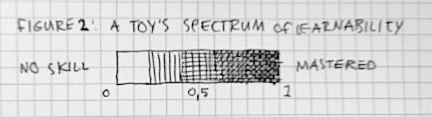
But a lot of the things I’m working on (for instance creative tools, but also toy-like environments) have more complex patterns and therefore (wether I like it or not) have a wider spectrum of learnability. And that’s where usability alone is not enough. That’s where in testing, I’d need to make sure people don’t just understand how to do stuff by looking at it. (That’s the start, for sure.) But I also want to be able to tell if people can get better at doing stuff. Because if they get better at it, that’s when they’ll be having fun.

Figure 2: A toy’s spectrum of learnability
  1. Or The Psychology of Everyday Things as it was then titled. []
  2. I still consider myself young, only slightly less cocky. []

Slides for my Oslo UXnet meetup talk

Last night I presented at the January UXnet meetup in Oslo. When Are invited me to come over I thought I’d be talking to maybe 60 user experience people. 200 showed up—talk about kicking off the year with a bang. I think the crew at Netlife Research may just have written UXnet history. I’m not sure. (Don’t believe me? Check out the RSVPs on the event’s page at Meetup.com)

The talk went OK. I had 20 minutes, which is pretty short. I finished on time, but I had to leave out a lot of examples. The original talk on which this was based is a 2 hour lecture I deliver at UX companies. (I did this last year for instance at InUse.)

The lack of examples was the biggest point of criticism I got afterwards. I’ll try to make up for that a bit in a later post, listing some examples of web sites and apps that I would call in some way playful. Stay tuned.

For now, here are the slides (no notes I’m afraid, so it’ll be hard to make any sense of them if you weren’t there). Thanks to Are Halland for inviting me. And greetings to all my friends in Oslo. You’ve got a beautiful UX thing going on there.

Speaking, lots and lots of speaking

First, the bad news: I won’t be able to make it to Interaction 08. Which sucks, because it looks like it’s going to be a wonderful conference with a smart crowd attending. I would have loved to meet up with friends there. And of course I was looking forward to sharing my ideas on playful products.

There’s plenty of other events in the pipeline for me though, both big and small. Here’s a rundown:

Next week on Tuesday 16 January I’ll be flying to Oslo on invitation of Are Halland at Netlife Research. I’ll do a short presentation at the UXnet meetup, focused on the application of game design to UX for the web.

Shortly after that, I’ll be participating in BarCampCopenhagen. I’ll probably do a session about my thoughts in mobile social gaming. Other than that I’m looking forward to just hanging out with the Danish geek crowd.

In February it’s time to cross the Atlantic to San Francisco for the Game Developers Conference. I’m speaking at GDC Mobile about designing casual gaming experiences for Generation C. I’m going to make good use of my complimentary all access pass. You’ll most likely find me playing weird stuff at the Independent Games Festival.

One final engagement taking place in June that I can already announce is From Business To Buttons, organised by my friends at InUse. Here I’ll get a chance to talk about the stuff that I had planned for Interaction 08: play, storytelling and complex systems. Looking forward to it.

If you’re reading this, and happen to be attending any of these events. Do drop by and say hi. I’d love to meet and chat!

Game design is ‘just’ specialised interaction design

First of all my best wishes to you for 2008. It’s been a bit quiet around here lately—the last proper post was published December 19. Shame on me. The usual apologies apply: I’ve been busy doing work, but also spend some time catching up with friends and family in the Netherlands around the holidays.

I was considering doing the traditional look back at 2007 and perhaps post some resolutions for the coming year, but I won’t. 2007 has segued into 2008. Therefore I feel it’s best to just dive in and tell you what’s been occupying my mind lately.

How exactly do the fields of game design and interaction design relate? I’ve found myself straddling the line between the two more and more often. And what I’ve been wondering: Can game design be considered a specialised sub-discipline of interaction design, or are the two equals with some overlap? (Or can interaction design perhaps even be considered part of game design?)

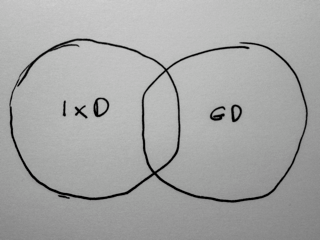
Here’s a diagram of how I tend to think of the relationship between the two fields:

Venn diagram of IxD and GD as equals with some overlap

Seen this way, interaction design and game design each have their own body of knowledge with some overlap. From this perspective you could consider my work to be brokering of some sort—passing information back and forth between the two. I tend to place myself in the interaction design circle, making the occasional foray into game design territory and bringing back interesting stuff I find.

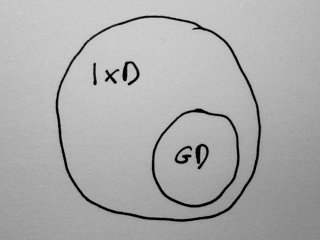
But there’s at least one other way of looking at these two fields:

Venn diagram of GD as part of IxD

I was trained to be an interaction designer. But part of the curriculum consisted of game design. Nowadays interaction design’s emphasis on efficiency naturally makes it irreconcilable with game design. At the Utrecht School of Arts, these two were not seen as being at odds with each other. You can consider this a gross oversight, or alternatively as proof of a far-reaching vision. Whatever.

In any case, it can be argued that (digital) game design is simply a very specialised sub-discipline of interaction design. This is not to say it is in any way less valuable than ‘regular’ interaction design. However, it might help people in both fields to advance their practice if they look at each other this way. Which is more or less a summary of what I’ve been arguing ever since I went freelance last year.

The problem is of course that in reality the two fields—or to be more exact the two communities of practice—are very much separate from each other. I’ve been trying to make some change there, in my own little way.

On the other hand this might just be me trying to justify my interest in game design as an interaction designer…

But perhaps there’s something more than just professional guilt at play here. I’m not sure yet. Some observations that might support one or the other view:

  • Although their definition of games is very exact, Salen & Zimmerman‘s definition of play is broader: “Play is free movement within a more rigid structure.” Isn’t that an apt description of what people do with anything interactive?
  • The Interaction Design Association defines interaction design on their site and says it concerns: “the structure and behavior of interactive products and services”. Surely that includes digital games?
  • I don’t have the book with me at the moment, but I seem to remember Koster mention something about game design ultimately being about putting people in touch with each other. Sounds like interaction design to me.

In any case, as long as I need 400+ words to explain why I want to do both interaction design and game design, I’ll be in trouble. Can you boil it down for me?

Storyboarding multi-touch interactions

I think it was around half a year ago that I wrote “UX designers should get into everyware”. Back then I did not expect to be part of a ubicomp project anytime soon. But here I am now, writing about work I did in the area of multi-touch interfaces.

Background

The people at InUse (Sweden’s premier interaction design consultancy firm) asked me to assist them with visualising potential uses of multi-touch technology in the context of a gated community. That’s right—an actual real-world physical real-estate development project. How cool is that?

InUse storyboard 1

This residential community is aimed at well-to-do seniors. As with most gated communities, it offers them convenience, security and prestige. You might shudder at the thought of living in one of these places (I know I have my reservations) but there’s not much use in judging people wanting to do so. Planned amenities include sports facilities, fine dining, onsite medical care, a cinema and on and on…

Social capital

One of the known issues with these ‘communities’ is that there’s not much evidence of social capital being higher there than in any regular neighbourhood. In fact some have argued that the global trend of gated communities is detrimental to the build-up of social capital in their surroundings. They throw up physical barriers that prevent free interaction of people. These are some of the things I tried to address: To see if we could support the emergence of community inside the residency using social tools while at the same counteracting physical barriers to the outside world with “virtual inroads” that allow for free interaction between residents and people in the periphery.

Being in the world

Another concern I tried to address is the different ways multi-touch interfaces can play a role in the lives of people. Recently Matt Jones addressed this in a post on the iPhone and Nokia’s upcoming multi-touch phones. In a community like the one I was designing for, the worst thing I could do is make every instance of multi-touch technology an attention-grabbing presence demanding full immersion from its user. In many cases ‘my’ users would be better served with them behaving in an unobtrusive way, allowing almost unconscious use. In other words: I tried to balance being in the world with being in the screen—applying each paradigm based on how appropriate it was given the user’s context. (After all, sometimes people want or even need to be immersed.)

Process

InUse had already prepared several personas representative of the future residents of the community. We went through those together and examined each for scenarios that would make good candidates for storyboarding. We wanted to come up with a range of scenarios that not only showed how these personas could be supported with multi-touch interfaces, but also illustrate the different spaces the interactions could take place in (private, semiprivate and public) and the scales at which the technology can operate (from small key-like tokens to full wall-screens).

InUse storyboard 2

I drafted each scenario as a textual outline and sketched the potential storyboards on thumbnail size. We went over those in a second workshop and refined them—making adjustments to better cover the concerns outlined above as well as improving clarity. We wanted to end up with a set of storyboards that could be used in a presentation for the client (the real-estate development firm) so we needed to balance user goals with business objectives. To that end we thought about and included examples of API-like integration of the platform with service providers in the periphery of the community. We also tried to create self-service experiences that would feel like being waited on by a personal butler.

Outcome

I ended up drawing three scenarios of around 9 panels each, digitising and cleaning them up on my Mac. Each scenario introduces a persona, the physical context of the interaction and the persona’s motivation that drives him to engage with the technology. The interactions visualised are a mix of gestures and engagements with multi-touch screens of different sizes. Usually the persona is supported in some way by a social dimension—fostering serendipity and emergence of real relations.

InUse storyboard 3

All in all I have to say I am pretty pleased with the result of this short but sweet engagement. Collaboration with the people of InUse was smooth (as was expected, since we are very much the same kind of animal) and there will be follow-up workshops with the client. It remains to be seen how much of this multi-touch stuff will find its way into the final gated community. That as always will depend on what makes business sense.

In any case it was a great opportunity for me to immerse myself fully in the interrelated topics of multi-touch, gesture, urbanism and sociality. And finally, it gave me the perfect excuse to sit down and do lots and lots of drawings.

Playyoo goes beta

Today Playyoo went beta. Playyoo is a mobile games community I have been involved with as a freelance interaction designer since july of this year. I don’t have time for an elaborate post-mortem, but here are some preliminary notes on what Playyoo is and what part I’ve played in its conception.

Playyoo's here

Playyoo brings some cool innovations to the mobile games space. It allows you to snack on free casual mobile games while on the go, using a personalized mobile web page. It stores your high scores and allows you to interact with your friends (and foes) on an accompanying regular web site. Playyoo is a platform for indie mobile game developers. Anyone can publish their Flash Lite game on it. Best of all — even if you’re not a mobile games developer, you can create a game of your own.

It’s that last bit I’ve worked on the most. I took care of the interaction design for an application imaginatively called the Game Creator. It allows you to take well known games (such as Lunar Lander) and give them your own personal twist. Obviously this includes the game’s graphics, but we’ve gone one step further. You can change the way the game works as well.

Screenshot of my lolcats pairs game on Playyoo

So in the example of Lunar Lander you can make the spaceship look like whatever you want. But you can also change the gravity, controlling the speed with which your ship drops to the surface. Best of all, you can create your own planet surface, as easy as drawing a line on paper. This is why Lunar Lander in the Playyoo Game Creator is called Line Lander. (See? Another imaginative title!)

At the moment there are six games in the Game Creator: Tic-Tac-Toe, Pairs, Revenge, Snake, Ping-Pong, and the aforementioned Line Lander. There’s long list of other games I’d like to put in there. I’m sure there will be more to come.

Since today’s launch, people have already started creating crazy stuff with it. There’s a maze-like snake game, for instance. And a game where you need to land a spider crab on the head of some person called Rebecca… I decided to chip in with a pairs game full of lolcats (an idea I’ve had since doing the very first wireframe.) Anyway, the mind boggles to think of what people might come up with next! That’s the cool part about creating a tool for creative expression.

Screenshot of a Line Lander game in progress in the Playyoo Game Creator

So although making a game is very different from playing one, I hope I managed to make it fun nonetheless. My ambition was to create a toy-like application that makes ‘creating’ a game a fun and engaging way to kill a few minutes — much like Mii creation on the Nintendo Wii, or playing with Spore‘s editors (although we still haven’t had the chance to actually play with latter, yet.) And who knows, perhaps it’ll inspire a few people to start developing games of their own. That would probably be the ultimate compliment.

In any case, I’d love to hear your comments, both positive and negative. And if you have a Flash Lite compatible phone, be sure to sign up with Playyoo. There is no other place offering you an endless stream of snack sized casual games on your phone. Once you’ve had a taste of that, I’m sure you’ll wonder how you ever got by without it.