A day of playing around with multi-touch and RoomWare

Last Saturday I attended a RoomWare workshop. The people of CanTouch were there too, and brought one of their prototype multi-touch tables. The aim for the day was to come up with applications of RoomWare (open source software that can sense presence of people in spaces) and multi-touch. I attended primarily because it was a good opportunity to spend a day messing around with a table.

Attendance was multifaceted, so while programmers were putting together a proof-of-concept, designers (such as Alexander Zeh, James Burke and I) came up with concepts for new interactions. The proof-of-concept was up and running at the end of then day: The table could sense who was in the room and display his or her Flickr photos, which you could then move around, scale, rotate, etc. in the typical multi-touch fashion.

The concepts designers came up with mainly focused on pulling in Last.fm data (again using RoomWare’s sensing capabilities) and displaying it for group-based exploration. Here’s a storyboard I quickly whipped up of one such application:
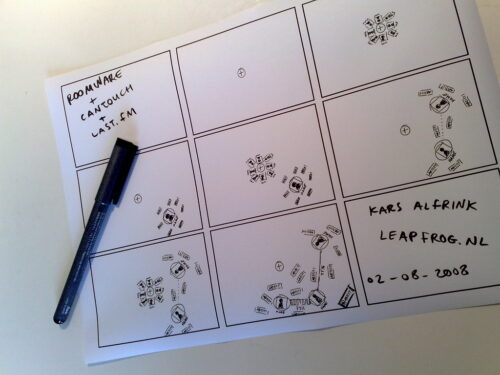
RoomWare + CanTouch + Last.fm

The storyboard shows how you can add yourself from a list of people present in the room. Your top artists flock around you. When more people are added, lines are drawn between you. The thickness of the line represents how similar your tastes are, according to Last.fm’s taste-o-meter. Also, shared top artists flock in such a way as to be closest to all related people. Finally, artists can be acted on to listen to music.

When I was sketching this, it became apparent that orientation of elements should follow very different rules from regular screens. I chose to sketch things so that they all point outwards, with the middle of the table as the orientation point.

By spending a day immersed in multi-touch stuff, some interesting design challenges became apparent:

  • With tabletop surfaces, stuff is closer or further away physically. Proximity of elements can be unintentionally interpreted as saying something about aspects such as importance, relevance, etc. Designers need to be even more aware of placement than before, plus conventions from vertically oriented screens no longer apply. Top-of-screen becomes furthest away and therefore least prominent in stead of most important.
  • With group-based interactions, it becomes tricky to determine who to address and where to address him or her. Sometimes the system should address the group as a whole. When 5 people are standing around a table, text-based interfaces become problematic since what is legible from one end of the table is unintelligible from the other. New conventions need to be developed for this as well. Alexander and I philosophized about placing text along circles and animating them so that they circulate around the table, for instance.
  • Besides these, many other interface challenges present themselves. One crucial piece of information for solving many of these is knowing where people are located around the table. This issue can be approached from different angles. By incorporating sensors in the table, detection may be automated and interfaces could me made to adapt automatically. This is the techno-centric angle. I am not convinced this is the way to go, because it diminishes people’s control over the experience. I would prefer to make the interface itself adjustable in natural ways, so that people can mold the representation to suit their context. With situated technologies like this, auto-magical adaptation is an “AI-hard” problem, and the price of failure is a severely degraded user experience from which people cannot recover because the system won’t let them.

All in all the workshop was a wonderful day of tinkering with like-minded individuals from radically different backgrounds. As a designer, I think this is one of the best way be involved with open source projects. On a day like this, technologists can be exposed to new interaction concepts while they are hacking away. At the same time designers get that rare opportunity to play around with technology as it is shaped. Quick-and-dirty sketches like the ones Alexander and I came up with are definitely the way to communicate ideas. The goal is to suggest, not to describe, after all. Technologists should feel free to elaborate and build on what designers come up with and vice-versa. I am curious to see which parts of what we came up with will find their way into future RoomWare projects.

links for 2008-07-31

Embodied interaction and improvised information displays

Recently a good friend of mine became a dad. It made me feel really old, but it also lead to an encounter with an improvised information display, which I’d like to tell you about, because it illustrates some of the things I have learnt from reading Paul Dourish’s Where the Action Is.

My friend’s son was born a bit too early, so we went to see him (the son) at the neonatology ward of the local hospital. It was there that I saw this whiteboard with stickers, writing and the familiar magnets on it:

Tracing of a photo of an improvised information display in a hospital neonatology ward consisting of a whiteboard, magnets, stickers and writing

(I decided to trace the photo I took of it and replace the names with fictional ones.)

Now, at first I only noticed parts of what was there. I saw the patient names on the left-hand side, and recognised the name of my friend’s son. I also noticed that on the right-hand side, the names of all the nurses on duty were there. I did not think much more of it.

Before leaving, my friend walked up to the whiteboard and said something along the lines of “yes, this is correct,” and touched one of the green magnets that was in the middle of the board as if to confirm this. It was then that my curiosity was piqued, and I asked my friend to explain what the board meant.

It turns out it was a wonderful thing, something I’ll call an improvised information display, for lack of a better word. What I had not seen the first time around, but were pointed out by my friend:

  1. There is a time axis along the top of the board. By placing a green magnet at the height of a child’s name somewhere along this axis, parents can let the staff know when they intend to visit. This is important for many reasons. One being that it helps the nurses time the moment a child will be fed so that the parents can be present. So in the example, the parents of ‘Faramond’ will be visiting around 21:00 hours.
  2. There are different colour magnets behind the children’s names, and behind the nurses’ names. This shows which nurse is responsible for which child. For instance, ‘Charlotte’ is in charge of ‘Once’s’ care.

Dourish’s book has influenced the way I look at things like this. It has made me more aware of their unique value. Whereas before I would think that something like this could be done better by a proper designer, with digital means, I now think the grasp-able aspect of such a display is vital. I also now believe that the prominent role of users in shaping the display is vital. Dourish writes:1

“What embodied interaction adds to existing representational practice is the understanding that representations are also themselves artefacts. Not only do they allow users to “reach through” and act upon the entity being represented, but they can also themselves be acted upon—picked up, examined, manipulated and rearranged.”

Parents and nurses reach through the display I saw in the neonatology ward to act upon the information about visiting times and responsibility of care. But they also act on the components of the display itself to manipulate the meaning they have.

In fact, this is how the display was constructed in the first place! The role of the designer in this display was limited to the components themselves. Designers were responsible for the affordances of the whiteboard, the magnets, the erasable markers and stickers, which enabled users to produce the information display they needed. In the words of Dourish:2

“Principle: Users, not designers, create and communicate meaning.”

“Principle: Users, not designers, manage coupling.”

It is the nurses and the parents and the social practice they together constitute that gives rise to the meaning of the display. What the board means is obvious to them, because they have ‘work’ that needs to be done together. It was not obvious to me, because I am not part of that group. It was not a designer that decided what the meaning of the different colours of the magnets were. It was a group of users who coupled meaning to the components they had available to them.

It might be a radical example, but I think this does demonstrate what people can do if the right components are made available to them, and they are allowed to make their own meaning with them. I think it is important for designers to realise this, and allow for this kind of manipulation of the products and services they shape. Clearly, Dourish’s notion of embodied interaction is a key to designing for adaptation and hacking. When it comes to this, today’s whiteboards, magnets and markers seem to do a better job than many of our current digital technologies.

  1. Page 169 [↩]
  2. Page 170 [↩]

links for 2008-07-30

links for 2008-07-25

Chris Crawford on design suggestions

I have a considerable amount of books with dog-eared pages lying around the office. One such book is The Game Design Reader, which contains a large and varied collection of essays on (yes) game design. This book probably has the largest number of dog-ears. Partly because it is quite thick, but also because it is filled to the brim with good stuff.

One essay is written by Chris Crawford. He is without a doubt one of the best known game designers out there, a real veteran of the industry. He is also a controversial character, often voicing unpopular opinions. I guess you could call him an iconoclast.

This iconoclasm shines through in his essay for TGDR. Crawford shares the story behind the design of Eastern Front (1941) his “first big hit”. Towards the end, he devotes some attention to game tuning, and has this to say about how you as a designer should approach suggestions from others:1

“Your job is to build a great design, not gratify your co-workers.”

According to him, a good designer has thought the system through so thoroughly, that the vast majority of suggestions have already passed through his mind. Therefore, these can all be rejected without much thought. If you are swamped with suggestions you have not thought of before, this is an indication you have not properly done your job.

I can only agree, but I think the real challenge is in rejecting these ideas in a persuasive manner. It is hard to make apparent the fact that you have thought all these things through.

One strategy I am pursuing is to be radically transparent in my process. I try to document every single consideration using quick and dirty sketches, and share all of these. This way, I hope to make apparent the thinking that has gone into the design.

What Chris Crawford makes clear is that design isn’t a popularity contest:2

“This isn’t noble; it’s stupid. Seriously considering every idea that drifts by isn’t a sign of open mindedness; it’s an indicator of indecisiveness. […] Be courteous, but concentrate on doing your job.”

Some time ago, Crawford more or less turned his back on the games industry and focussed his attention on the thorny problem of interactive storytelling. The outcomes of this are finally seeing the light of day in the shape of Storytron; a company that offers a free authoring tool as well as ready-to-play ‘storyworlds’.

I wasn’t too impressed with the interaction design of the authoring tool, but the concept remains intriguing. We’ll see where it goes.

If this has piqued your curiosity; Chris Crawford will be speaking at IDEA 2008 in Chicago, 7–8 October. Reason enough to attend, in my humble opinion.

  1. Page 723 [↩]
  2. Ibid. [↩]